

When we are playing Free Fire, ping issues can suddenly appear at any time. The game starts lagging, the 999 error shows up, and the game gets stuck, making it difficult to play properly. This is one of the most frustrating issues for Free Fire players, as it can happen without warning and ruin the entire gameplay experience.
To help fix this problem, I will recommend the top 5 VPNs in this blog post that can significantly reduce ping issues in Free Fire. By using them, you can enjoy smoother and more lag-free gameplay.
Why Do Players Use VPNs for Free Fire?
Players use VPNs for Free Fire mainly to fix bad ISP routing that causes high ping, switch to regional servers for friends or events, and protect against DDoS attacks during ranked matches. A VPN won’t fix every ping problem, but it solves real problems in specific situations.
Here is 3 reason to Players Use VPNs for Free Fire
- Free Fire runs on 15 regional servers, including Singapore, Indonesia, India, and Brazil. Each server has its own events, matchmaking system, and sometimes exclusive rewards. Because of this, many Free Fire players want to switch to a specific server to access those events and rewards, which often requires the use of a VPN.
- In some cases, ping increases because of ISP throttling. This usually happens when a large number of players are connected to the same server at the same time, causing heavy network traffic.
- Another common reason is poor routing between your ISP and the game server, even if your internet speed is good. In such situations, a VPN can improve the connection by choosing a different and faster route. However, if your ISP already provides efficient routing, using a VPN may increase latency instead of reducing ping.
According to CNET, Using the right VPN can reduce your ping by up to 50 ms. That is why choosing the right VPN is very important for every player. The choice should also depend on your mobile device’s configuration, as many players still use older smartphones and need to run a VPN on them.
Premium VPNs add 1-15ms on good routes but can cut 20-50ms on bad ones.
First Try In Game Setting
Before using any VPN, the most important thing is to check the in-game network settings. In the Account and Basics section of Free Fire, you will find a Network Settings option. Turning it on can improve network stability and may help reduce ping issues to a large extent.
If the setting is already enabled, turn it off once and then enable it again. This refreshes the setting.
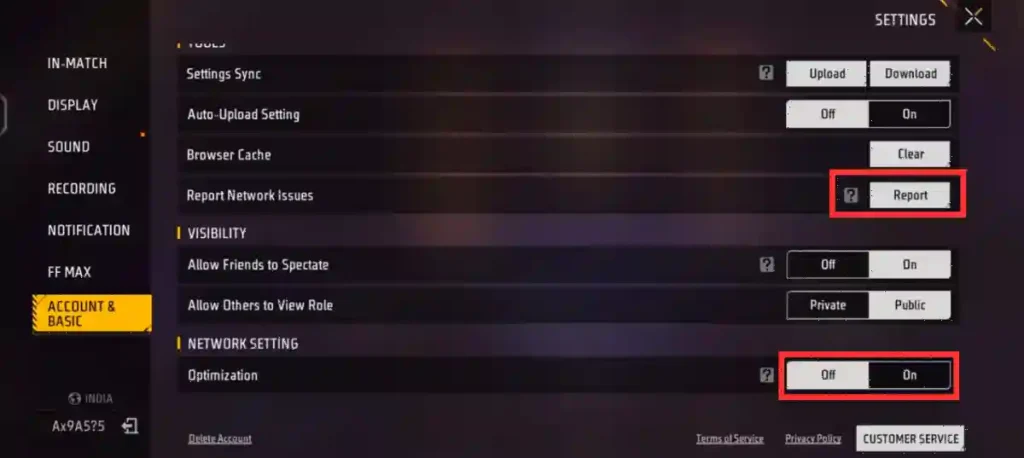
If the problem still continues, use the Report Network Issue option located above it. By reporting your issue there, your complaint is sent to Garena’s team, and they can provide the necessary support to help resolve the problem as quickly as possible.
If the ping issue remains even after trying all these methods, you can use a good VPN based on your needs and your device’s configuration.
Our Top 5 VPN Recommendations for Free Fire
| VPN | Developer | Free Model | Account Needed? | Best For |
|---|---|---|---|---|
| QuickVPN | Lipisoft Inc. | Fully free, ad-supported | No | QuickVPN is the simplest option. No signup needed. Just open the app, tap connect, and pick a server. It checks server ping automatically. |
| Proton VPN | Proton AG | Free tier, no ads | Yes (free account) | Proton VPN is the most trusted free VPN. No account required on mobile. It offers unlimited data and servers in 10 countries. You cannot manually pick your server on the free plan. |
| VPN Free (Super™) | TOPAPPS TECH PTE LTD | Free, ad-supported | No | VPN Free is built for mobile gamers. No registration, no login. It has one-tap connect and servers in Asia, Europe, and the Americas. |
| Hotspot Shield | Anchorfree LLC | Free with ads, “Proceed” option | Optional | Hotspot Shield is one of the oldest free VPNs. No account needed. It uses the Hydra protocol for speed. |
| Urban VPN | Urban VPN | 100% free, no sign-up | No | Urban VPN is fully free on desktop with limited mobile access. No signup required. It has servers in 89+ countries. |
You can get started for free with the VPNs listed here. With some of them, you can watch ads to gain more usage time, or you like the performance and want unlimited access, upgrade to the Pro version.
How to Set Up Any of These Free VPNs for Free Fire
Every VPN on this list follows the same basic process, and none of them require you to fill in a form or verify an email.
Step-by-step:
- Download the app from the official Google Play Store or App Store. Don’t use third-party APKs.
- Open the app. If it asks you to sign in, look for a “Skip,” “Proceed,” or “Continue as Guest” option. All five VPNs on this list have this.
- Choose a server close to your target Free Fire region. Closer to the game server almost always means lower ping.
- Tap connect before opening Free Fire.
- Launch Free Fire and check your ping in Display Settings. If it’s worse than normal, disconnect the VPN.
- Stay on the same server every time you log into that account. Switching regions frequently is what triggers account flags.
For additional network options, check out our Free Fire proxy server download guide.
Conclusion
Three things to remember. First, try in-game settings and report issues to Garena before using a VPN. Second, pick a free VPN that needs no login. Third, never risk your main account by switching servers carelessly. Free Fire locks accounts to their creation server.
Free VPNs are great for testing and casual play, but they come with trade-offs. Most show ads, limit daily data, or log your activity. Free Fire’s Terms of Service state that Garena can terminate accounts for violations. If you plan to play ranked daily, consider upgrading later.
For more tips, see our guides on best control settings and fixing lag.
Frequently Asked Questions
Garena can terminate accounts for violations. Using a VPN to exploit regional pricing can trigger security flags.
Under 40ms is excellent, 41-80ms is good, and 81-120ms is playable.
Not necessarily. A VPN will likely add latency if your ISP already routes you well.
Yes, but your progress does not transfer.
A 999 ping spike means a complete connection drop. This can happen because of Wi-Fi interference, background apps, or an overloaded VPN server.












Diamond hack
I like the efforts you have put in this, regards for all the great content.
InShot