

It is important for every game to have a system that manages player behavior and keeps the environment positive. Similarly, Free Fire has an Honor Score System to maintain better game behavior.
In Free Fire, 100 is the perfect Honor Score. In this blog post, we will explain how to increase your Honor Score and how it works, which every player should know.
What Is Honor Score in Free Fire?
Honor Score is a player behavior rating system in Free Fire that tracks how fairly you play and respect each other. A scale from 0 to 100 has been set to measure this. According to the Garena, if you maintain an Honor Score of 100, your positive behavior is also rewarded with in-game items.
This score acts as your in-game reputation. Every player starts with a high score. However, negative actions will quickly drain it. The system monitors your activity to ensure a healthy gaming environment. You can read more about recent system tweaks in our guide on the latest Free Fire OB54 update.
Your Honor Score is not the same as your rank or your level. You can be a Heroic player with a score of 60, and you still will not be allowed into ranked matches. That is why understanding this system matters more than your K/D ratio.
Step-by-Step Methods to Raise Honor Score Fast
To Increase Honor Score in Free Fire, You need a solid strategy. Here are the most effective methods to increase your points safely.
1. Finish Every Match Cleanly
Whenever you play a match, make sure to finish it until the end. If there is a network problem in between, or your team gets eliminated while you are still in the game, you should continue playing until the match ends.
You should not quit in the middle and then start the next match or another match with your friend. Do not do that. Whatever match you play, you should play it until the end and finish it completely. The system rewards players who see a match through to the final circle.
2. Best Modes for Recovery
If your Honor score has become very low because of AFK penalties, play less competitive modes. Lone Wolf, Classic, or Casual mode are perfect for this. These modes are less stressful, and you also get Honor Points for completing the game. You can also use this time to practice your aim.
Check out our guide on how to increase your headshot rate to survive longer in these recovery matches.
3. Play With Friends or Guilds
Random teammates report you for anything. They report you for not reviving them fast enough. They report you for taking the airdrop they wanted. They even report you for being too good.
Play with friends or guild members instead. They know your playstyle. They will not file fake reports. Plus, coordinated squads revive each other more often, which gives small honor bonuses. If you do not have active friends, join a casual guild that focuses on daily matches.
4. Chat and Report Management
If you are playing a match with a random player and they use abusive language or say words that hurt you during voice chat, do not respond to them in the same language. One heated conversation can lead to the entire enemy squad reporting you. Garena’s system reviews chat logs, and using bad language can make your Honor score drop quickly.
If you see a real hacker, report them after the match. But do not spam the report button on every player who kills you. False reporting weakens the system and can backfire on you. For better aim and less frustration, set up your best Free Fire control settings and one-tap headshot sensitivity before you queue up.
How to Check Your Honor Score
You can check your Honor Score directly inside the Free Fire app. You need to know your current standing before you can fix it. Checking your score is easy.
Step1 : Open Free Fire and go to the main lobby.

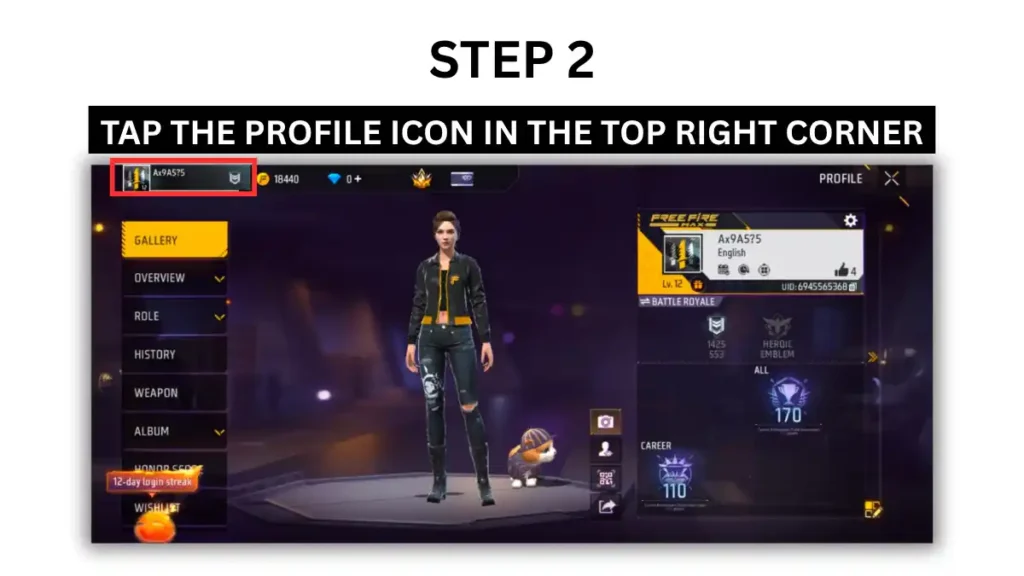
Step 2: Tap the Settings icon in the top right corner.
Step 3: Tap on HONOR Score Section
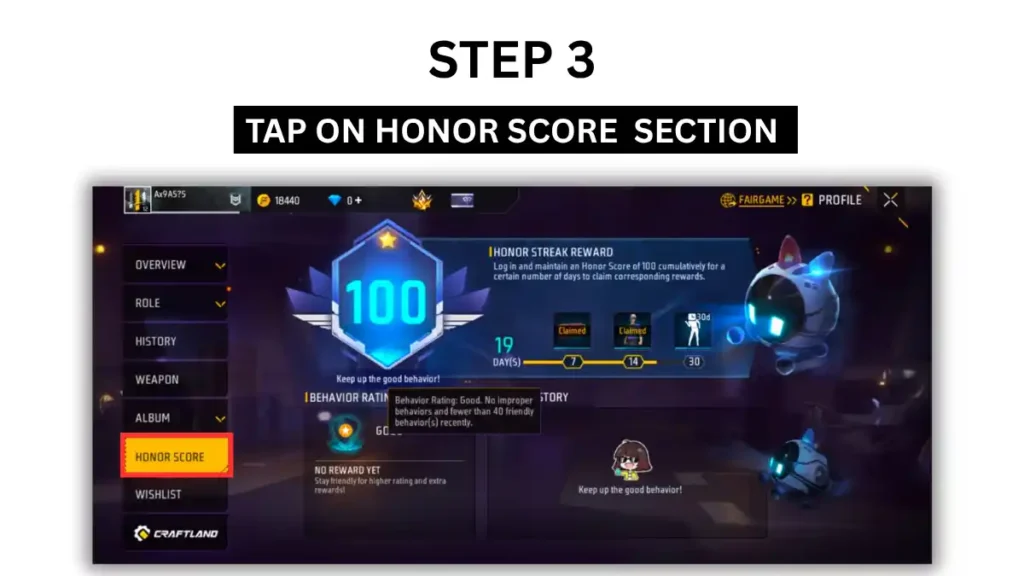
Make it a habit to check your Honor Score every week. This allows you to identify minor issues before they escalate into major problems.
Step 4: Your current Honor Score will be displayed prominently on the screen
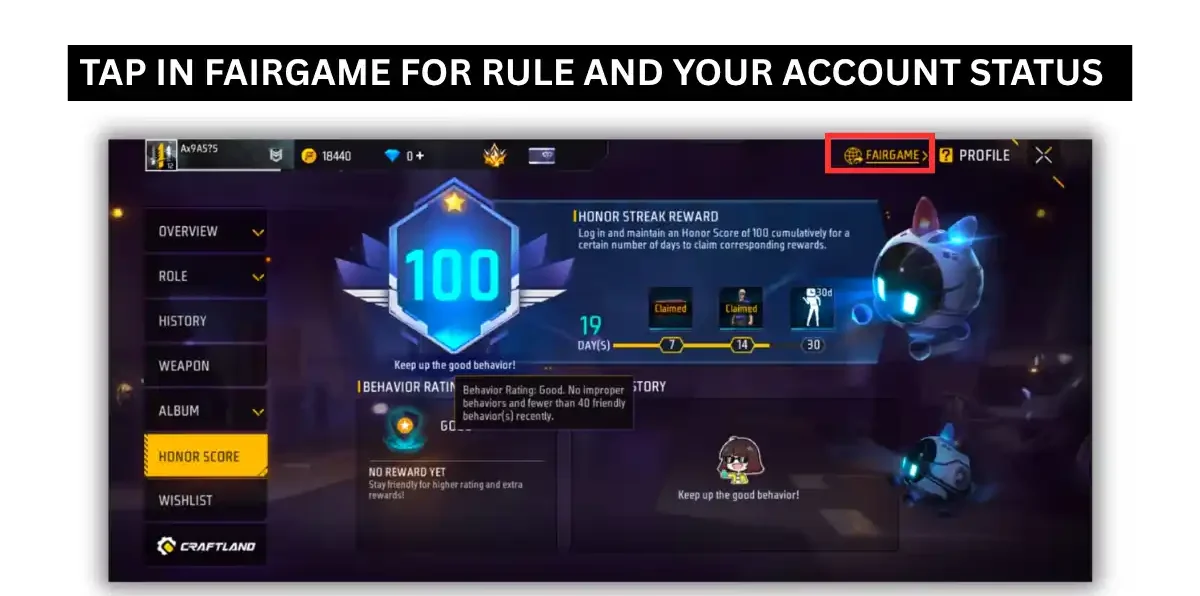
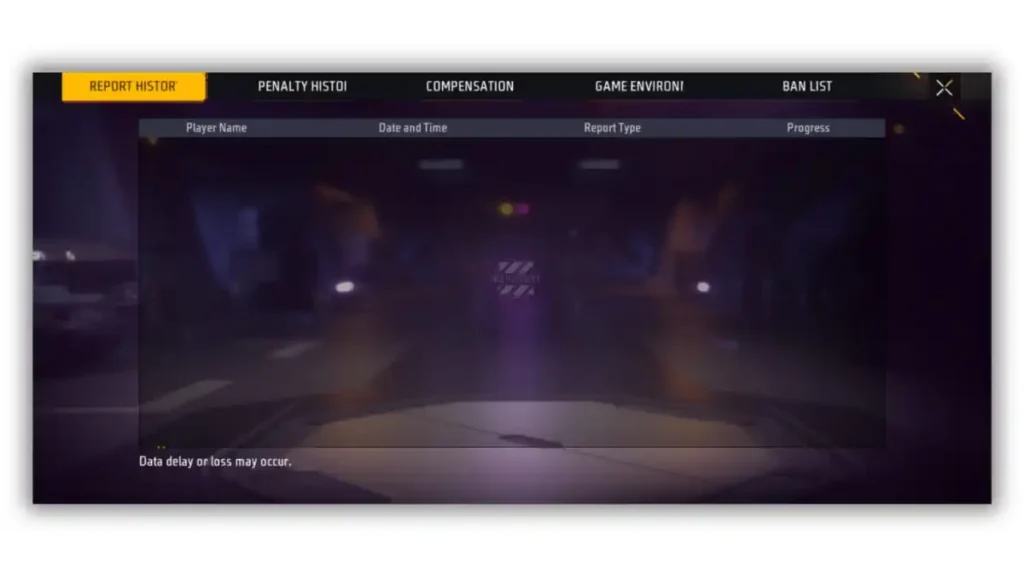
In the FAIRGAME section shown in the image above, you can check the status of everything on your profile:
- Report History
- Penalty History
- Compensation
- Game Environment
- Ban List
All these things can be checked in one place, under the Fair Game section. From here, you can see who reported your profile, the reason for the report, and why each action caused your Honor Score to increase or decrease. All these details can be checked and analyzed in this section.
How Many Points Can You Gain Per Day?
Players typically gain 1 to 3 Honor points per clean, full match. Recovery is intentionally designed to be slower than the deduction rate. This means you cannot fix a low score in a single gaming session.
The math is straightforward but requires patience. If you lose 10 points, you might need 5 to 10 clean matches to get them back. According to BlueStacks guide, Consistent match completion is the only reliable way to recover honor score. Do not expect overnight fixes. Slow and steady gameplay is the key to recover your honor score.
Why Does My Honor Score Drop Fast but Recover So Slowly?
Your Honor Score decrease fast but recovers slowly because Garena’s algorithm weighs penalties more heavily than rewards. This is intentional. Garena wants to discourage bad behavior immediately, so one AFK or toxic match can cost you 5 to 8 points. But earning those points back requires 5 to 8 clean matches. The system is designed to punish quickly and reward gradually.
If your score is stuck at 94 or 97 and not moving despite clean play, you are not alone. Reddit players report the same issue, especially after major updates like OB52. The fix is simple but boring: keep playing clean Classic matches. The stuck score usually resolves after 3 to 5 additional clean finishes. If it stays stuck for over a week, submit a ticket to Garena Help Center with screenshots.
Complete Recovery Plan: 40 to 100
If your score is 40, here is your realistic timeline:
- Days 1 to 3: Play 5 clean Classic matches daily. Score should reach 55 to 60.
- Days 4 to 7: Play 5 to 7 clean matches daily. Score should reach 75 to 80.
- Days 8 to 14: Play 5 clean matches daily. Score should reach 90 to 95.
- Days 15 to 21: Play 3 to 5 clean matches daily to reach 100 and stabilize.
That is 30 to 50 total clean matches across 2 to 3 weeks. There is no faster way. Anyone promising a shortcut is lying.
Final Word
Honor Score is a system that shows how you treat your teammates and how committed you are to finishing what you start. Recovery takes time, but every clean match brings you closer to full access.
Remember that Garena investigates reports carefully, so do not panic over a single fake report. Follow the 6-day recovery plan if your score is low, and focus on consistent, positive play.
If you found this guide helpful, bookmark it and share it with a friend who is stuck at 60. Also check out our guides on Free Fire headshot sensitivity and how to get free diamonds in Free Fire. Drop your current Honor Score in the comments below, and I will help you plan your recovery.
Frequently Asked Questions
No. Garena’s system requires multiple verified reports or system-detected toxic behavior to deduct points. A single fake report from a rival rarely triggers a penalty. The system is designed to filter out malicious reporting.
At an average of 2 points per clean match, you need 30 clean matches to reach 100. If you play 5 clean matches a day, this requires a strict 6-day recovery plan. Patience is essential for safe recovery.
This is intentional game design. Instant drops act as a strong deterrent against rage-quitting. Slow recovery ensures players must demonstrate sustained good behavior over time, rather than fixing their reputation in one match.
Yes. Lone Wolf and Casual modes are shorter and less stressful. They reduce the risk of AFK penalties while still granting Honor points for match completion. It is a safe environment to rebuild your score.
Sudden connection drops can sometimes trigger false AFK penalties. However, the system aims to verify these actions. If you face consistent false penalties due to internet issues, you can appeal through official Garena support channels.









Well explained and practical.
Great article, thanks for sharing!