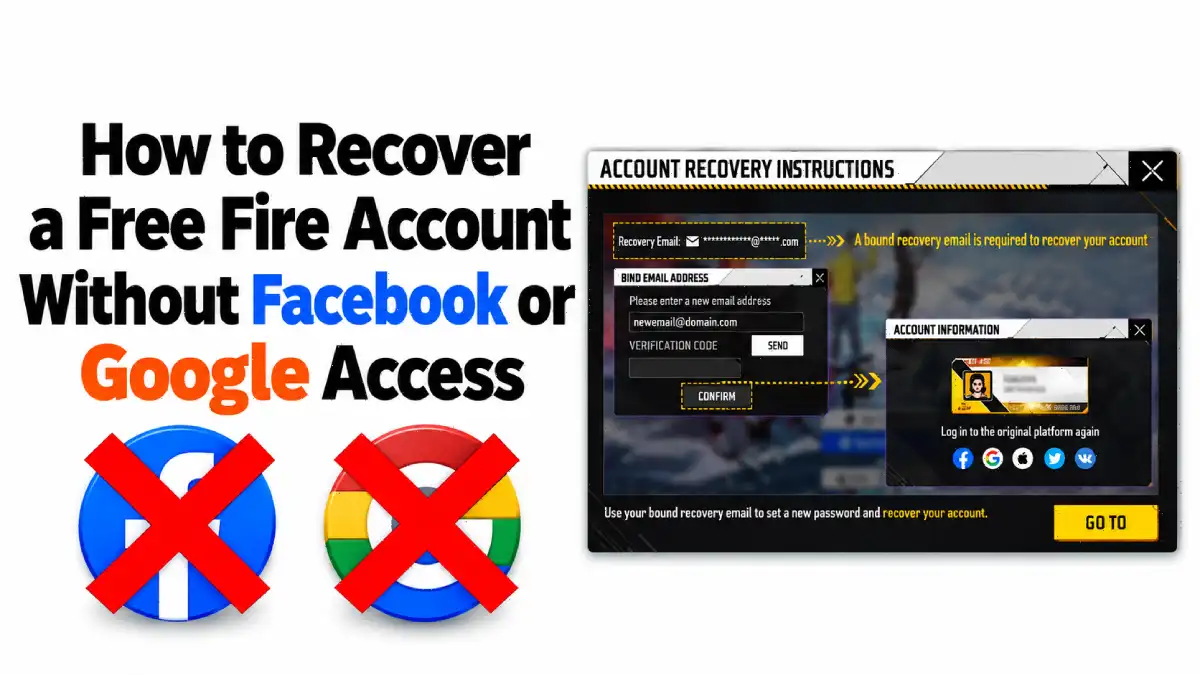
Many players create their Free Fire accounts, connect them to Google, Facebook, X, or another supported platform, and continue playing without thinking about account recovery. The problem arises when they forget their login credentials, lose access to their registered email address, or can no longer access their social media account for another reason.
In such situations, recovering the Free Fire account may become difficult. Garena’s official support guidance explains that players who lose access to their linked platform account should contact that platform directly if they have not previously bound a recovery email to their game account. However, players who have already configured a recovery email may have another recovery option.
This guide explains how Free Fire account recovery works, why a recovery email is important, and how players can reduce the risk of permanently losing access to their accounts.
What is Free Fire Account Security Levels?
Free Fire’s account security system highlights three levels of protection: Low, Medium, and High. The security-level screen shown in the game explains how different account-binding methods affect account protection.
1. Low Security: Guest Account
A guest account offers the lowest level of account protection. According to the security information displayed in the game, guest accounts may be lost during version updates and cannot be accessed across different devices in the same way as properly linked accounts.
Players who play with guest accounts risk losing access to their progress if they encounter a device problem or need to switch phones. Therefore, leaving a valuable Free Fire account as a guest account is not a reliable long-term option.
2. Medium Security: Account Linked to a Third-Party Platform
The next level involves linking the Free Fire account to a supported third-party platform, such as Google, Facebook, X, or Apple, depending on the available options.
This allows players to sign in on supported devices using their linked platform account. However, problems can arise when the player loses access to that platform because of a forgotten password, a compromised account, or a verification issue.
For example, a player who originally linked Free Fire to Google may struggle to sign in if Google requests verification through a phone that is no longer available.
Although linking a third-party platform is an important step, players should also consider how they would recover their game account if access to that platform became unavailable.
3. High Security: Account Bound to a Recovery Email
The highest security level shown in the provided Free Fire security screen involves binding the game account to a recovery email.
This additional recovery option can become particularly useful when a player loses access to the original third-party platform. Rather than depending entirely on the original login method, an eligible player with a recovery email already bound to the game account may be able to use that email to bind the game account to a different platform account.
This is the key precaution that players should understand before they encounter an account-access problem.
The most important lesson is simple: account recovery should be configured before access is lost, not after the problem occurs.
How to Recover a Free Fire Account Without Facebook or Google Access
The recovery process depends on whether a recovery email was bound to the Free Fire account before the original login problem occurred.
Case 1: A Recovery Email Is Already Bound to the Free Fire Account
Players who previously bound a recovery email may have an alternative way to regain access to their game account.
Garena’s official Recover Lost Account support guide explains that players who lose access to their current platform account but have a recovery email bound to their game account may use the email to bind the game account to a different platform account.
The practical steps are as follows:
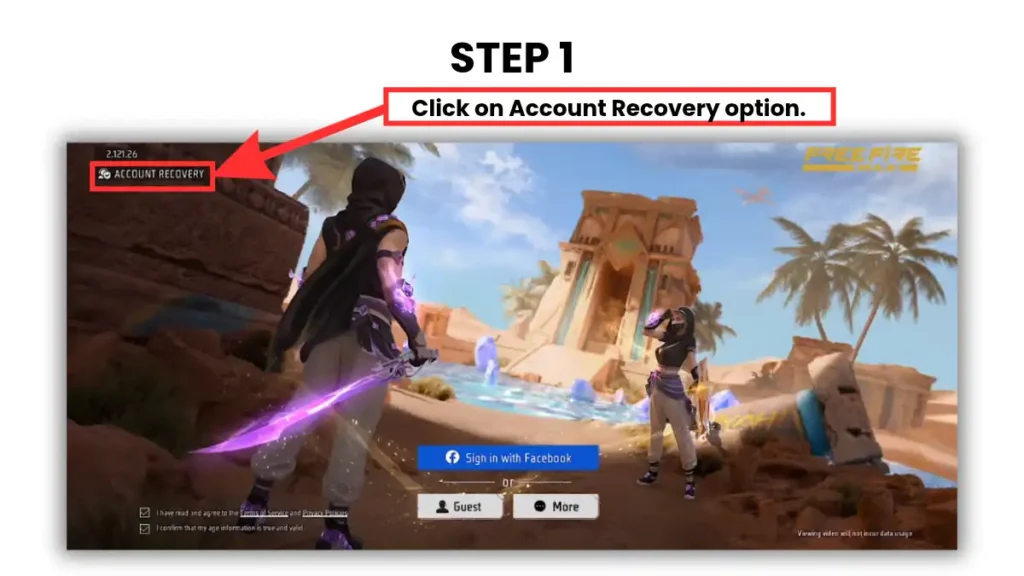
Step 1- Open Free Fire and tap on Account Recovery option on the top left side of log in Screen
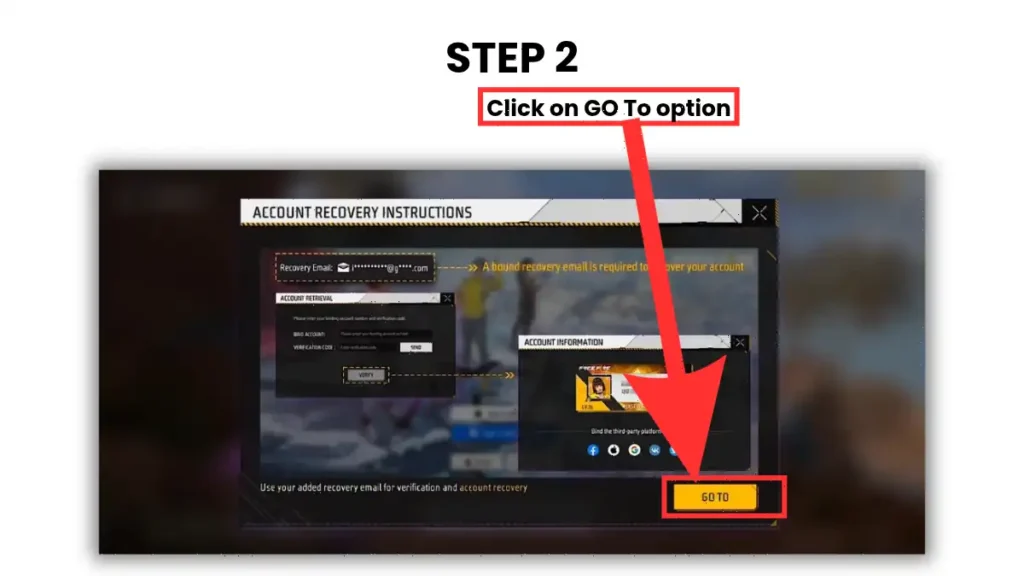
Step 2– Click on GO TO option
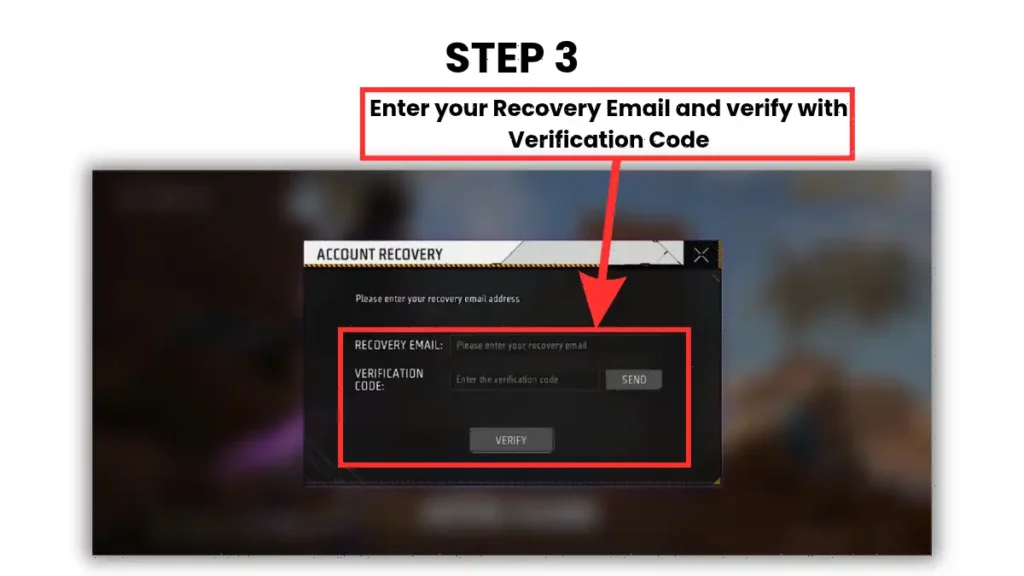
Step 3- Follow Garena’s prescribed recovery process using that recovery email
Step 4– Secure the new login method and keep the recovery email accessible.
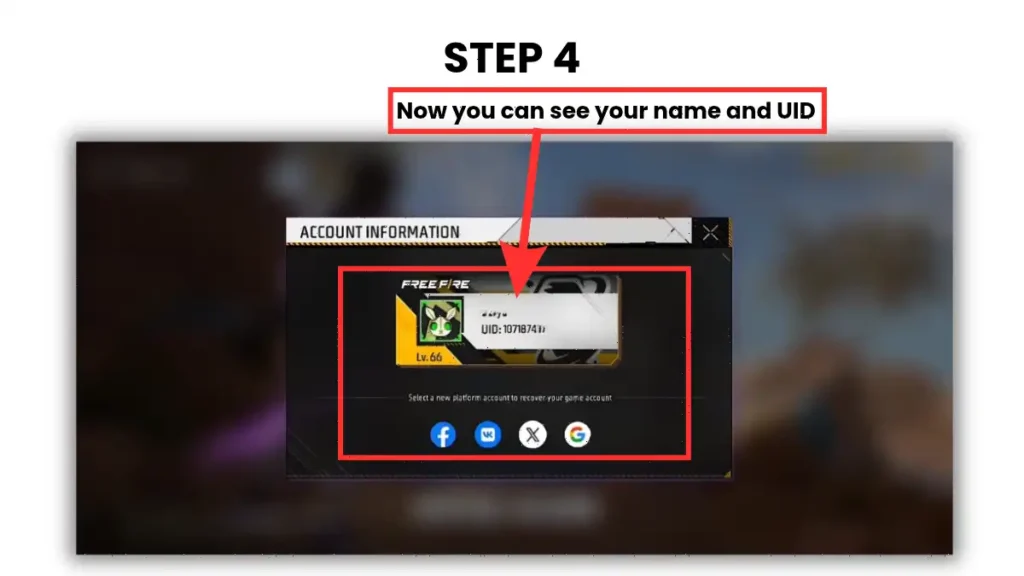
The exact steps and available options may depend on the account’s current status and Garena’s recovery procedure. Players should follow the instructions provided through official support rather than relying on unofficial recovery services.
Case 2: No Recovery Email Was Bound Before Access Was Lost
The situation becomes more difficult when a player loses access to Facebook, Google, VK, X, or another linked platform without having previously Bind With recovery email.
Garena’s official Lost Login Account support article states that players who lose access to their linked platform account should contact the relevant platform directly to attempt to recover it.
This means Garena cannot necessarily restore access to the original Facebook or Google account on the player’s behalf. The player must first pursue the appropriate recovery process with the platform that manages the login account.
For example, if a Free Fire account was linked to Google and the player subsequently lost access to that Google account, the appropriate starting point is Google’s account recovery process. If the game account was linked to Facebook, the player should use Facebook’s account recovery options.
Without a previously bound recovery email, recovering the original login account may be the only available route to regaining access to the linked Free Fire account.
Why Every Free Fire Player Should Secure Their Gmail Account
Binding a recovery email to a Free Fire account is an important precaution, but protecting the email account itself is equally important. If the recovery email becomes inaccessible, the player may face another obstacle when attempting to recover the game account.
For this reason, players should review their Google Account recovery settings and ensure that their registered information is current.
Add a Recovery Phone Number
A recovery phone number can help restore access to a Google Account when the primary sign-in method is unavailable. For example, if a player forgets their password or loses access to their usual device, Google may offer eligible recovery methods to verify their identity.
Players should add a phone number they control, keep it updated, and make sure it remains accessible.
Add a Recovery Email Address
A recovery email address provides another way to receive account-recovery instructions when the primary email account cannot be accessed.
Ideally, the recovery email should be an account that remains accessible independently of the primary email. If both email accounts depend on the same lost device or inaccessible login method, the additional recovery option may not help when it is needed most.
A trusted person’s contact information should only be used with their permission and with a clear understanding of how it will be used. Personal account credentials should never be shared simply to make recovery easier.
Final Thoughts
Recovering a Free Fire account without Facebook or Google access depends largely on the precautions taken before access was lost. Players who previously bound a recovery email may have an alternative recovery route, while those who did not may need to recover their original third-party account directly through the relevant platform.
Ultimately, account security should be treated as part of setting up a Free Fire account, not as something to consider only after losing access.
If a recovery email was previously bound to the Free Fire account, eligible players may use it to bind the game account to a different supported platform. Without a recovery email, players should contact the original platform, such as Google or Facebook, to recover their account.
Yes, eligible players who previously bound a recovery email may use it to recover access through Garena’s official recovery process. Follow the instructions provided in the Garena Recover Lost Account guide.
No. Garena states that it cannot recover a player’s lost access to a third-party platform account. Players must contact Google, Facebook, or the relevant platform directly to restore access.
If the original Facebook, Google, VK, or X account becomes inaccessible and no recovery email was bound, the player should attempt to recover the original platform account through its official recovery process.
Open Free Fire and check the account security or recovery settings available in the game. Follow the official instructions to bind and verify a recovery email. The available options may vary depending on the account and game version.