
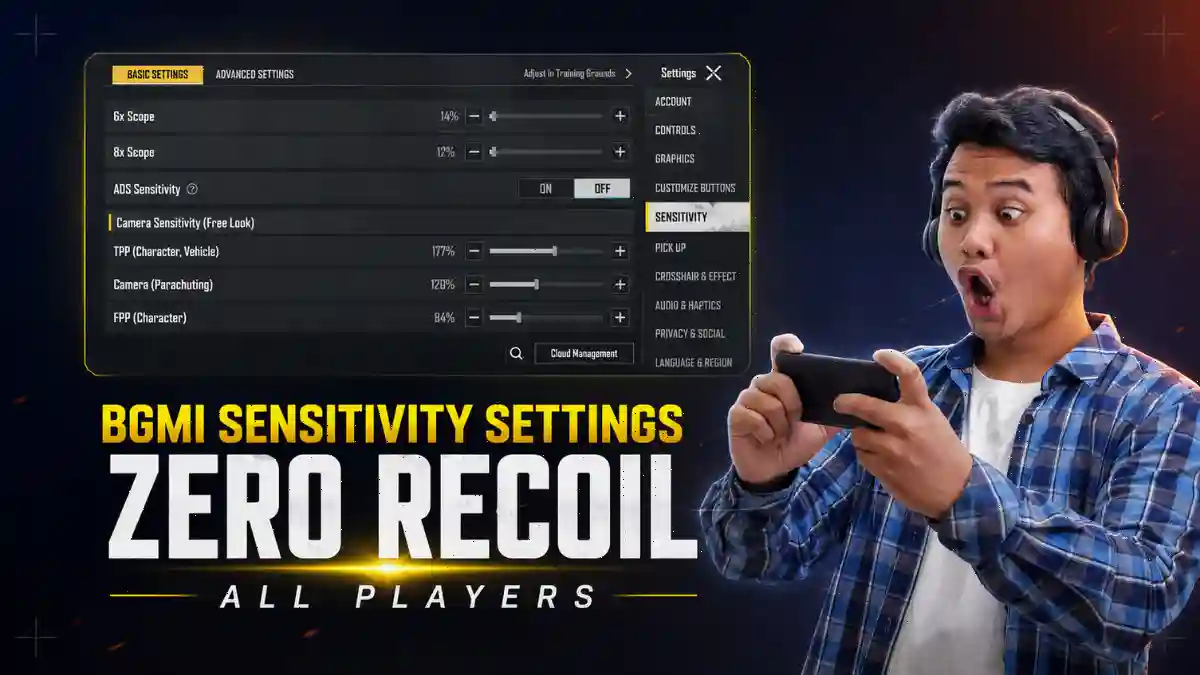
In BGMI, every player possesses a unique playing style. Furthermore, everyone uses different devices. In India, the majority of players use Android devices to play BGMI. Consequently, sensitivity settings should be customized by each individual to suit their own preferences, rather than simply copying a professional player’s settings and applying them to one’s own gameplay.
The BGMI 4.4 update also shifted recoil patterns on several Android devices, so settings that worked in patch 4.3 may already feel slightly off. This guide gives you starter values, the right questions to ask about your device, and a clear method to build a sensitivity code that actually belongs to you.
What Are BGMI Sensitivity Settings?
BGMI sensitivity settings are a group of five controls that determine how fast your camera, scope, and aim respond to your touch and device movement. They are Camera Sensitivity, Free Look Sensitivity, ADS Sensitivity, Gyroscope Sensitivity, and ADS Gyroscope Sensitivity.
If you customize these 5 settings according to your gameplay style, your recoil will be reduced. Your tracking will improve, and your aim will become significantly smoother, enabling you to land running headshots with ease.
Let me give you a short overview of their functions.
- Camera Sensitivity controls how fast your view moves when you drag your finger across the screen without aiming down sights. Set it too high and you’ll overshoot every time you try to scan. Set it too low and you’ll be turning like a tank.
- Free Look Sensitivity handles the camera when you hold the eye button to look around without moving your character. Most players ignore this. Don’t.
- ADS Sensitivity is for the sensitivity when you’re aiming through a scope. This is touch-based. Each scope (Red Dot, 2x, 3x, 4x, 6x, 8x) has its own value. This is where most of your spray control actually lives.
- Gyroscope Sensitivity uses your phone’s motion sensor to help you aim and control recoil by tilting your device. Tilt down, your gun tilts down with it. It’s faster than dragging your thumb, which is why almost every pro player in India uses it.
- ADS Gyroscope Sensitivity is the gyro sensitivity that activates specifically when you’re shooting through a scope. It gives you extra recoil control on top of your regular gyro.
All five Sensitivity Settings work together. Change one without thinking about the others and your aim falls apart.
How to Change and Test Sensitivity Settings in BGMI?
Customizing sensitivity settings follows an almost same process on both Android and iOS devices. Here is commplete process explain step by setp that you can customize according to your gameplay.
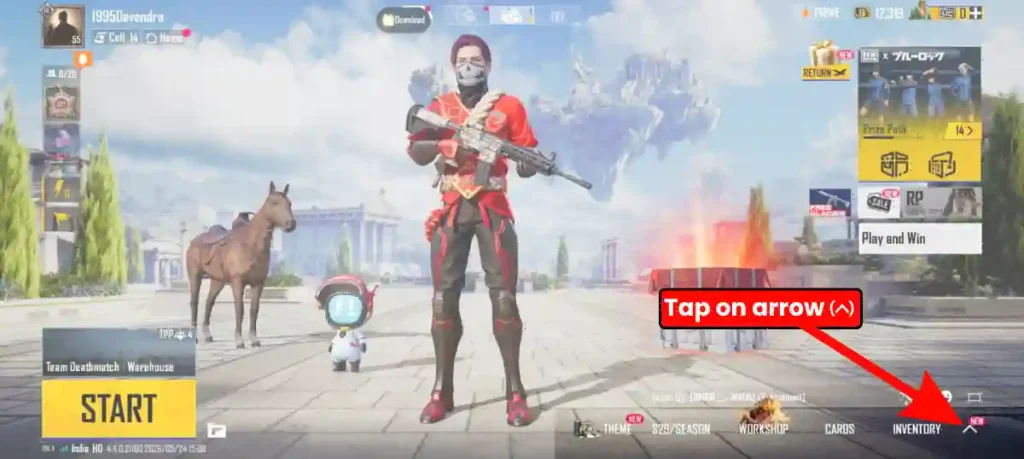
Step 1: Open BGMI and tap on arrow icon in right corner bottom side.
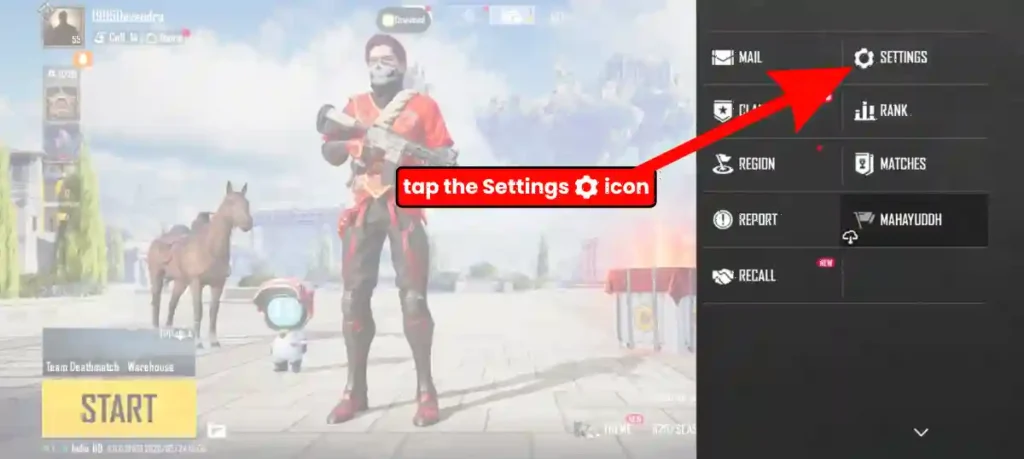
Step 2: Tap the Settings icon
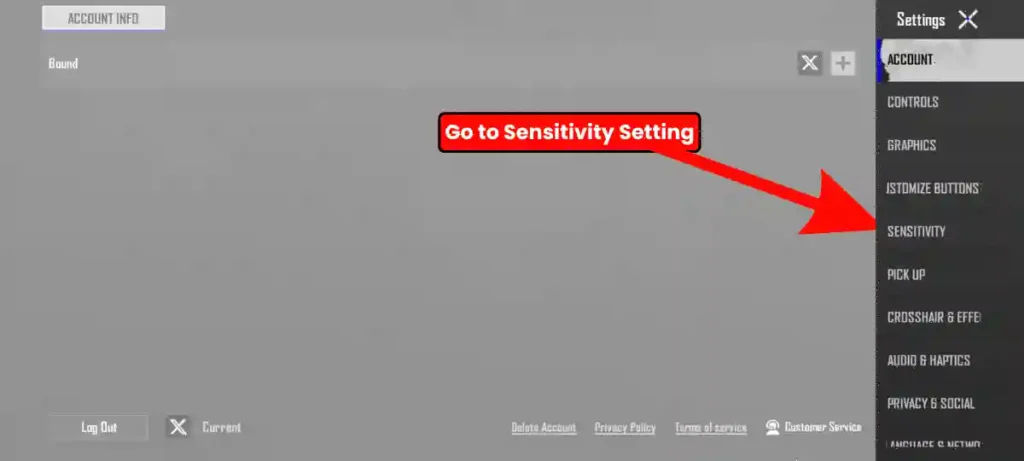
Step 3: Go to Sensitivity.
Step 4: Tap Layout Management in the top right corner.
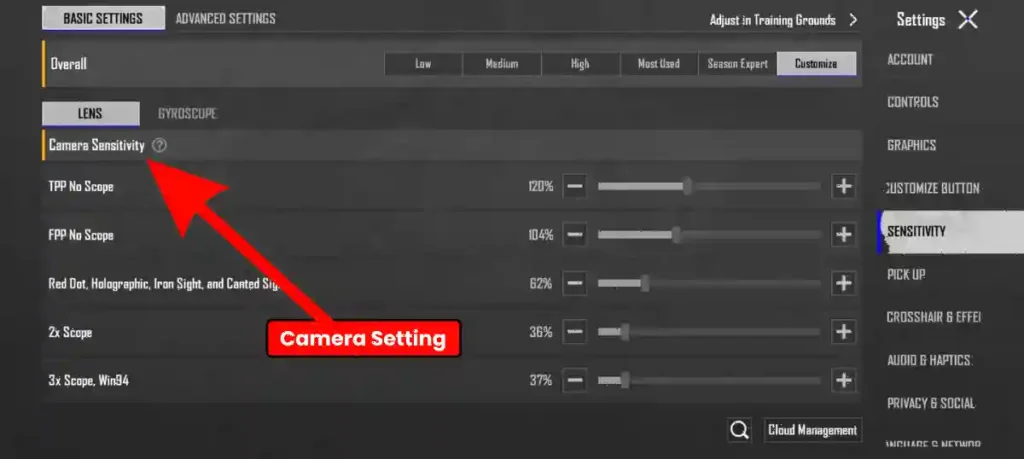
Following the BGMI 4.4 update, numerous options are available in the sensitivity settings, allowing for the manual customization of camera sensitivity, ADS sensitivity, the gyroscope, and every other setting. The interface also features a dedicated section for overall sensitivity, offering options such as Low, Medium, High, Most Used, Session Expert, and Customize.
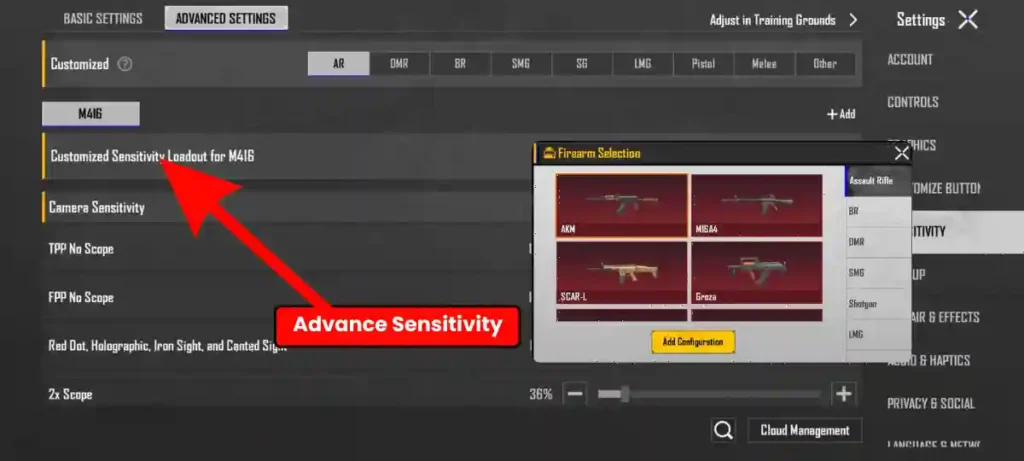
The sensitivity settings also include an advanced option that allows for the customization of specific, individual sensitivity settings for each weapon. For instance, if a player prefers using the M416, they can manually customize sensitivity layout for M416 only.
You can also set custom sensitivity levels for different guns, like SMGs, rifles, snipers, and the DP28.
Camera and Free Look Sensitivity
Camera settings control overall view movement and awareness. Balanced values prevent sluggish scanning while avoiding disorientation.
For most Android players, these are solid starting values for Camera Sensitivity:
| Setting | Low-End Android (60Hz) | Medium-End Android (60Hz) | High-End Android (90Hz+) | Most Used |
|---|---|---|---|---|
| TPP No Scope | 80% | 100% | 120% | 120% |
| FPP No Scope | 70% | 88% | 104% | 104% |
| Red Dot, Holo, Iron Sight, and Canted Sight | 40% | 50% | 60% | 60% |
| 2x Scope | 24% | 30% | 36% | 36% |
| 3x Scope | 17% | 22% | 27% | 27% |
| 4x Scope | 11% | 14% | 17% | 17% |
| 6x Scope | 9% | 12% | 14% | 14% |
| 8x Scope | 8% | 10% | 12% | 12% |
TPP No Scope should sit around 115-120% for mid-to-high-end devices. On a 60Hz phone, knock it down slightly. Your camera will still respond well, but without the jittery feeling that kills close-range tracking.
Free Look can usually match your Camera Sensitivity. Most players don’t need to touch it separately unless they feel their look-around speed is off.
How to adjust camera sensitivity?
To properly adjust camera sensitivity, you can follow these steps:
- Select Weapons and Attachments: First, pick up a gun and equip it with only a Flash Hider, a Scope, and an Extended Mag. Ensure that you do not use any other attachments besides these.
- Set TPP No Scope: Go to Camera Sensitivity within the Settings menu and initially set your TPP No Scope sensitivity to 100.
- Shift Your Aim: Next, transfer your aim to the targets in front of you, one by one.
- Adjust sensitivity like this:
- If your aim overshoots the target slightly while shifting your aim between targets, decrease your sensitivity by 5 (-5).
- If your aim falls slightly short of the target, increase your sensitivity by +5.
Similarly, adjust your TPP No Scope sensitivity by adding or subtracting 5 until it feels perfect for you. You need to follow this same method to set the camera sensitivity for all your scopes (such as Red Dot, 3x, 4x, etc.).
Important Tip: If you are a non-gyro player, this camera sensitivity is crucial for you, as you control your entire aim solely with your thumb; if it is not set correctly, your aim will consistently be poor.
ADS Sensitivity
ADS sensitivity is the sensitivity that comes into effect after pressing the fire button, and it primarily serves to control recoil during firing. Every scope needs its own value. Here are starting points for non-gyro Android players:
| Scope | Low-End Android (60Hz) | Medium-End Android (60Hz) | High-End Android (90Hz+) | Most Used |
|---|---|---|---|---|
| TPP No Scope | 80% | 100% | 120% | 115% |
| FPP No Scope | 70% | 88% | 104% | 100% |
| Red Dot, Holo, Iron Sight, and Canted Sight | 40% | 50% | 60% | 58% |
| 2x Scope | 24% | 30% | 36% | 35% |
| 3x Scope | 17% | 22% | 27% | 25% |
| 4x Scope | 11% | 14% | 17% | 15% |
| 6x Scope | 9% | 12% | 14% | 13% |
| 8x Scope | 8% | 10% | 12% | 11% |
If you use gyroscope, drop these ADS values lower. Your gyro handles the recoil work. Your ADS just needs to feel comfortable for small corrections.
How to adjust ADS sensitivity?
To adjust this correctly, you can follow the methods given below:
How to Set Non-Gyro ADS Sensitivity:
- Weapons and Attachments: First, select a weapon and equip it with only a Flash Hider and an Extended Mag.
- Test the Spray: Fire (spray) at the targets in front of you using all of your scopes.
Sensitivity Adjustment: If your spray is drifting upwards, you need to increase your sensitivity by +5 (plus 5). Should I follow the exact same process that was used when adjusting the Camera Sensitivity?
How to Set Gyroscope ADS Sensitivity:
- You can keep your TPP No Scope Camera Sensitivity and TPP No Scope ADS Sensitivity the same; this will not cause any issues.
- To set the sensitivity for scopes, practice spraying at targets.
- If your spray drifts upwards, increase the sensitivity for that specific scope by +10.
- If your spray drifts downwards, decrease your sensitivity by -10.
You need to repeat this same process with all the scopes available in the game so that the recoil of each individual scope comes under your control.
For a full breakdown of which scope to use in which fight, check out our BGMI scope guide for close, mid, and long-range fights. Your sensitivity and your scope choice are connected.
Best Gyroscope Settings for Android
Most pro players in India play with Gyroscope Always On. It gives them gyro assist in every situation, including close-range no-scope fights where tilting the phone down means pulling bullets toward the enemy’s chest.
Here are recommended gyro starting values:
| Scope | Low-End Android (60Hz) | Medium-End Android (60Hz) | High-End Android (90Hz+) | Most Used |
|---|---|---|---|---|
| TPP No Scope | 80% | 100% | 120% | 115% |
| FPP No Scope | 76% | 95% | 114% | 110% |
| Red Dot, Holo, Iron Sight, and Canted Sight | 72% | 90% | 108% | 105% |
| 2x Scope | 60% | 75% | 90% | 90% |
| 3x Scope | 50% | 62% | 75% | 75% |
| 4x Scope | 40% | 50% | 60% | 60% |
| 6x Scope | 34% | 42% | 50% | 50% |
| 8x Scope | 28% | 35% | 42% | 42% |
Gyro sensitivity isn’t universal because BGMI’s input response is directly shaped by your phone’s hardware. Pro players often maintain high no-scope gyro values for fluid movement while tapering higher scopes for precision.
How to adjust the Gyroscope settings?
1. Gyroscope TPP No Scope Settings:
- First, set your Gyroscope TPP No Scope sensitivity to 300.
- Next, test it by repeatedly shifting your aim between the targets in front of you.
- If your aim overshoots the target slightly, decrease your sensitivity by 10 (-10).
- If your aim falls slightly short of the target, increase your sensitivity by 10 (+10).
Important Note: It is crucial to set this up correctly, because if done incorrectly, you will face significant difficulties in close-range fights and crosshair placement.
2. Gyroscope Scope Settings:
You need to apply this exact same method to all the scopes in your game. Shift your aim onto the targets and fine-tune your current sensitivity, adjusting it by +10 or -10 as needed, until your aim becomes perfect.
3. Gyroscope ADS Sensitivity
- You can keep your Gyroscope TPP No Scope Camera and ADS TPP No Scope sensitivities exactly the same. You will not getting any issues with this.
- To set the ADS sensitivity for different scopes, test them by spraying (firing) at targets.
- If your spray drifts upwards, you should increase the sensitivity for that specific scope by +10.
- If your spray drifts downwards, decrease your sensitivity by -10.
- Test each scope by spraying, and adjust its sensitivity according to this same formula (+10 or -10).
Extra Tip: Sensitivity merely determines how much the in-game camera moves when you move your device. No sensitivity setting can automatically guarantee you headshots. Therefore, after configuring your sensitivity, you must practice extensively with it yourself to truly master it. Avoid copying other player’s sensitivity settings.
Best BGMI Sensitivity Code 2026
If you are looking for a BGMI Sensitivity Code, a comprehensive blog post has been written on this topic, explaining in detail how to properly configure sensitivity and identifying what is considered the best sensitivity code.
- For two-thumb and two-finger players
- For three-finger players
- For four-finger players
In addition to this, various types of sensitivity codes have been included, which can prove to be highly useful in enhancing gameplay. The entire process has been explained step-by-step in the blog post, from where you can copy a suitable sensitivity code according to your specific needs.
Final Word
If you want to become a pro player in BGMI, create your own sensitivity setting and master it, because pro players create their own unique sensitivity codes and achieve mastery over them. That is why they are able to play so exceptionally well. however, this will not happen overnight. Making it yours takes consistent daily practice.
Bolt Esports recommends playing TDM daily specifically for gyro muscle memory, since the motion of tilting your device through unpredictable close-range fights trains your hands and brain at the same time.
You don’t need Jonathan’s code. You need your code, practiced until it’s automatic.
If you have any questions, please be sure to post them in the comment box. I answer all comments, and if you liked this post, please share it with your clan.
Frequently Asked Questions
True zero recoil doesn’t exist in BGMI, but you can get very close.
“Scope On” is better for most players. It activates gyro only when you aim down sights, so it controls recoil without affecting your hip-fire or free movement.
Because the code was built on a different device.
Give any new sensitivity at least 7 days before judging it.



very informative articles or reviews at this time.
Adven server