CapCut has been officially banned in India since 2020, but you can still install it safely using a VPN. Skip the cracked APKs entirely they’re a serious data theft risk. The only two VPNs that consistently work with CapCut even after major app updates are Hotspot Shield (best for Android) and Proton VPN (best for PC and laptop). Both are free and available from official stores. This guide shows you the exact steps.
So it makes total sense that people in India keep searching for how to install CapCut in India even though the app is officially banned. For over seven years, I have been using CapCut in India. During this time, it has become clear that with the right VPN, CapCut works without any interruptions.
Why Is CapCut Banned in India?
In June 2020, the Indian government banned over 59 Chinese-origin apps under Section 69A of the Information Technology Act, 2000. CapCut was on that list. So were TikTok, UC Browser, and a bunch of others all developed by Chinese companies.
The core concern was data privacy. CapCut is made by ByteDance the same company behind TikTok. Indian authorities flagged that these apps were allegedly collecting and transmitting user data to servers outside India without proper consent.
As of 2026, the ban has not been reversed. CapCut is still not available on the Indian Google Play Store or Apple App Store. That’s why you need a workaround.
Why Do People in India Still Choose CapCut Over Other Video Editors?
India has no shortage of video editors. InShot, KineMaster, PowerDirector, and VN Video Editor are all available on the Play Store right now without VPN, no ban, no workaround needed. So why do people still go out of their way to install a banned app?
The biggest reason is how fast you can go from raw clips to a finished, professional-looking video. CapCut’s readymade Templates let you drop your photos or clips in and the app builds the video for you transitions, music, pacing, all done. That kind of speed doesn’t exist in the other editors at this level.
On top of that, CapCut’s text animations, filter variety, and AI tools are genuinely ahead of what’s available in India’s legal alternatives. And the entire feature set is free. No watermark. No paywall hiding the good stuff.
Here’s how CapCut stacks up against the editors Indian users actually have access to:
| Feature | CapCut | InShot | KineMaster | PowerDirector | VN Video Editor |
|---|---|---|---|---|---|
| Advanced Filters & Variety | Huge library, free | Limited free options | Good, but mostly paid | Basic on free plan | Limited variety |
| Readymade Themes/Templates | Massive, trending daily | Very limited | Some, mostly paid | Few free templates | Minimal |
| Text Animation & Design | Advanced, many styles | Basic animations only | Moderate, some paid | Basic | Basic |
| AI Features (auto captions, BG remove, upscale) | Full AI suite, mostly free | Very limited | Some AI, mostly paid | Limited AI tools | No AI features |
| Watermark-Free Export (Free) | Always free | Watermark on free plan | Watermark on free plan | Watermark on free plan | Free, no watermark |
| Beginner-Friendly Interface | Very easy to learn | Easy | Moderate learning curve | Moderate | Easy |
| Professional Results in Less Time | Yes, with templates | Takes more effort | Takes more effort | Takes more effort | Takes more effort |
| Available in India (No VPN) | Banned | Yes | Yes | Yes | Yes |
That last row is the only area where CapCut loses. Everything else? It wins and it wins for free. That’s exactly why Indian users are willing to go through the effort of installing it.
Is It Safe to Install CapCut in India?
Yes, but only if you download it from CapCut’s official website or the Play Store using a VPN, and skip any third-party APK sites entirely. That’s the line between safe and risky.
There are hundreds of websites and apps offering “CapCut APK downloads” for Indian users. Most of these are cracked or modified versions of the app. Downloading cracked APKs puts your personal data at serious risk. These files can contain hidden malware that steals your passwords, accesses your camera, or hijacks your phone’s storage.
The good news is that you don’t need any of that. CapCut’s official APK is available directly from capcut.com, and the Play Store method using a VPN gives you automatic updates with zero risk. Stick to those two sources. Your phone will thank you.
What Is the Best VPN for CapCut in India?
The two VPNs that consistently work with CapCut in India even after new app updates are Hotspot Shield (best for Android) and Proton VPN (best for PC and laptop). Both are free, both are available from official sources, and both have held up across multiple CapCut version changes.
Over 7 years of using CapCut in India, I tested close to 10 different VPNs from the Play Store. Most of them work fine at first. But the moment CapCut releases a major update, those VPNs start giving server errors. CapCut stops loading features. Your edit freezes mid-session. It’s genuinely frustrating.
Hotspot Shield and Proton VPN are different. I’ve watched both survive update after update without dropping connection. Here’s why each one earns its spot:
- Hotspot Shield (for Android): Hotspot Shield uses its own proprietary Hydra protocol, which is independently rated as one of the fastest VPN connections available. On Android, this makes a real difference for a data-heavy app like CapCut. The free version connects you to a US-based server automatically no setup needed. Top10VPN’s 2026 review confirmed Hotspot Shield as one of the fastest VPNs tested. Download it directly from the Google Play Store.
- Proton VPN (for PC/Laptop): Proton VPN is based in Switzerland, where some of the world’s strongest privacy laws apply. Its free tier has no data cap which is rare for free VPNs. More importantly, Proton VPN on desktop has an auto-select server feature. You don’t need to choose a specific country. It picks the fastest available server for you. I’ve been using it for PC for about 3 years and it runs CapCut completely smoothly. Download it from protonvpn.com.
How to Install CapCut in India on Android (Step-by-Step)
The safest Android method uses Hotspot Shield to change your Play Store region, then downloads CapCut directly from the store so you always get the latest official version with automatic updates.
- Step 1: Open the Google Play Store and search for Hotspot Shield VPN. Download and install it.
- Step 2: Open Hotspot Shield and tap Connect. The free version automatically connects to a US server. Wait for the connection to confirm.
- Step 3: Long-press the Google Play Store icon on your home screen and tap the info (i) button to open App Info.
- Step 4: Inside App Info, go to Storage and Cache and tap Clear Cache. This clears India’s regional data from the Play Store so it picks up your new (US) location.
- Step 5: Open the Play Store. Go to Settings (top-right profile icon) → General → Account and Device Preferences → Country and Profiles.
- Step 6: Search for CapCut in the Play Store. It should now appear. Tap Install.
- Step 7: Once installed, keep Hotspot Shield connected every time you open CapCut. The app needs a VPN to function and load features properly in India.
This method means CapCut updates automatically through the Play Store, just like any other app on your phone.
From my experience, you’ll want Android 14 or above and at least 8 GB of RAM for a smooth editing session. On Android 13 or lower with 6 GB RAM, you might notice some lag — especially when importing and exporting video. Clear your storage before big projects too, so CapCut has room to work. If your phone is lagging on other apps too, check our Free Fire lag fix guide for low-end Android devices for performance tips that apply to any heavy app.
This app is not available in your country” error?
Your VPN is connected, but CapCut is not appearing in the Play Store, is that right? Don’t panic. This issue is quite common and vary simple to resolve.
First try this
Switch your Play Store account. Open the Play Store, tap your profile photo in the top-right corner, and sign in with a different Google account. Then, search for CapCut.
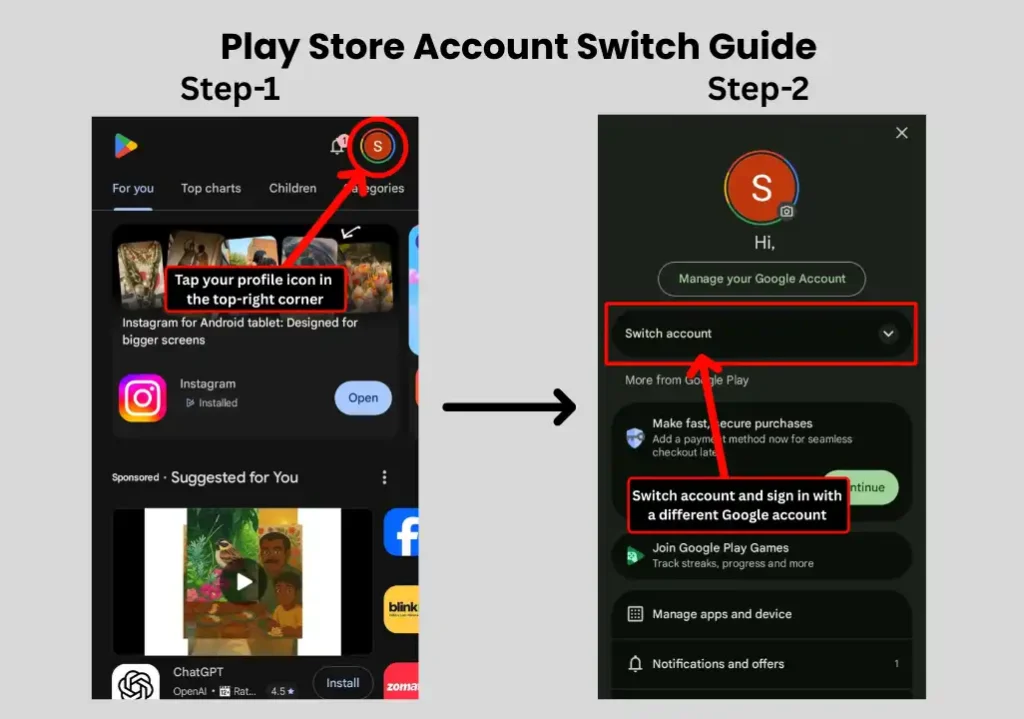
This is a simple trick, but in 99% of cases, it solves the problem. If you don’t have another Google account on your phone, create a new one and try using that. CapCut will appear immediately then you can downloaded safely.
How to Install CapCut on PC or Laptop in India
For PC users in India, Proton VPN is the best choice. Its auto-connect feature means you don’t need to pick a server it does it for you and CapCut runs smoothly on the resulting connection every time.
- Step 1: On your PC or laptop, go to protonvpn.com/download/download-windows and download the free Proton VPN installer. Create a free account if you don’t have one.
- Step 2: Install Proton VPN and log in. Click Quick Connect. Proton VPN automatically selects the best available server for your location. You don’t need to manually pick a country.
- Step 3: Once connected, open your browser and go to capcut.com/tools/video-editor-download.
- Step 4: Click Download for Windows (or Mac if applicable). The installer file roughly 200 MB — will start downloading.
- Step 5: Open the downloaded file and follow the on-screen installation steps. Accept the terms, choose your installation folder, and let it finish.
- Step 6: Launch CapCut from your desktop. Sign in with your Google, TikTok, or Facebook account to access all features.
Keep Proton VPN running in the background whenever you use CapCut. If CapCut doesn’t load a feature properly, check that your VPN is still connected first. That’s the most common fix.
Before you dive into CapCut on PC, make sure your system meets the minimum requirements listed on CapCut’s official site: Windows 10 (64-bit) or above, and at least an Intel Core i3 processor. For a smooth experience with longer edits, 8 GB of system RAM is recommended. If you’re building or upgrading your setup, our gaming PC setup guide for beginners covers everything you need to know.
Final Thoughts
Here’s what this all comes down to. CapCut is banned in India but it’s not inaccessible. The gap between “banned” and “unusable” is just two things: the right VPN and the right download source.
Use Hotspot Shield on Android. Use Proton VPN on PC. Download only from the official CapCut website or the Play Store. Never touch cracked APKs. That’s the whole strategy and it’s been working for me for 7 years straight.
For more practical guides on gaming, apps, and tech in India, explore everything we cover over at Gaming News Lab. And if you want to level up your gaming and content creation skills beyond the tools you use, we’ve got you covered there too.
Frequently Asked Questions
Yes. As of 2026, CapCut remains officially banned in India under the Information Technology Act, 2000.
You can download the official CapCut APK safely, but only from CapCut’s own website.
Based on 7 years of personal testing in India, Hotspot Shield is the most reliable free VPN for CapCut on Android, and Proton VPN is the best choice for PC.
For the smoothest experience, you’ll want at least 8 GB of RAM and Android 14 or above. On 6 GB RAM devices, you may notice lag during import and export, especially with longer video files.
Yes. CapCut’s desktop version is completely free to download and offers most editing features without any cost.