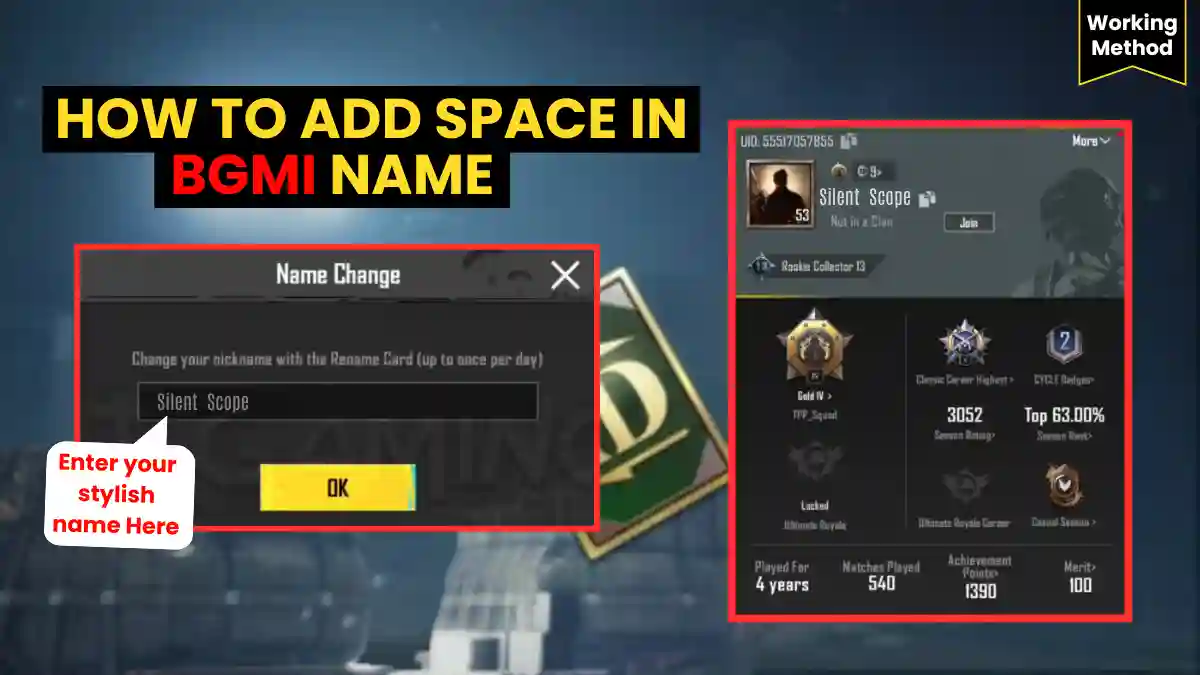
Choosing the perfect in-game name in Battlegrounds Mobile India isn’t just about looks, it’s about identity. A stylish BGMI name with spaces makes you stand out in lobbies, clan wars, and kill feeds.
Whether you’re a competitive esports player or a casual squad player, your name sets the first impression. In this guide, you’ll learn all working methods to add space in BGMI name in 2025, including invisible character codes, symbol combos, and troubleshooting tips.
Why Players Want Space in BGMI Names
BGMI does not allow normal keyboard spaces, but players still prefer spaced names because:
- They look clean and aesthetic
- Names become easier to read in kill feed
- They help create clan-style formatting
- They feel more professional and rare
- They improve identity and branding in esports & streaming
Compare these two names:
| Status | Name |
|---|---|
| ❌ Incorrect | DarkSniper |
| ✅ Correct | DarkㅤSniper |
The second one clearly looks better.
Also Read- BGMI Maker Krafton Bets ₹55,000 Crore on India- Will Gaming Make a Comeback?
Method 1: Add Space in BGMI Name Using Invisible Character (100% Working)
This is the most effective and popular method:
Step-by-Step Instructions
1. Copy the invisible space below
2. Open BGMI
3. Go to Inventory
4. Tap on Rename Card
5. Enter your name like this: Darkㅤ Sniper
6. Confirm and save
That’s it! Your BGMI name will now show with a space.
Method 2: Use Invisible Character Combos (If Single Fails)
Sometimes BGMI rejects single invisible characters. Use these tested combos:
| Combo | Unicode | Success Rate |
|---|---|---|
| ㅤ + U+2060 | U+3164 + U+2060 | 95% |
| U+200C + U+00A0 | Zero Width Non-Joiner + No-Break Space | 90% |
| U+200D + U+2060 | Zero Width Joiner + Word Joiner | 88% |
How to use: Copy both characters → Paste together → Use in name.
Also Read- Epic Games Free Games List (2025): Weekly, Holiday & Always-Free Titles Explained
Method 3: Space + Symbol Combination
You can combine invisible spaces with symbols for extra style.
Examples:
亗DarkㅤSniper亗★ShadowㅤKing★『GhostㅤOP』
Always test symbols first—some devices may not support them.
Space Alternatives in BGMI (With Compatibility)
Apart from Hangul filler, Characters That appear like space:
| Character | Looks Like Space | Works in BGMI | Unicode |
|---|---|---|---|
| ㅤ | Yes | ✅ Best | U+3164 |
| · | Small gap | ✅ | U+00B7 |
| ᅠ | Invisible | ⚠️ Sometimes | U+115F |
| _ | Visible | ❌ Not space | U+005F |
Recommended: Always use ㅤㅤinvisible space That appear like space and 100% working in BGMI.
RELATED POST- BGMI 90 FPS Supported Devices List 2026
BGMI Name Character Limit
When choosing a name in BGMI, it’s crucial to pay attention to the character limit. Your in-game name must have a minimum of 4 characters and a maximum of 16 characters are allowed.
Keep in mind that any invisible spaces you add to the name also count as characters, so be sure to check the total character count before saving your name.
How to Change BGMI Name
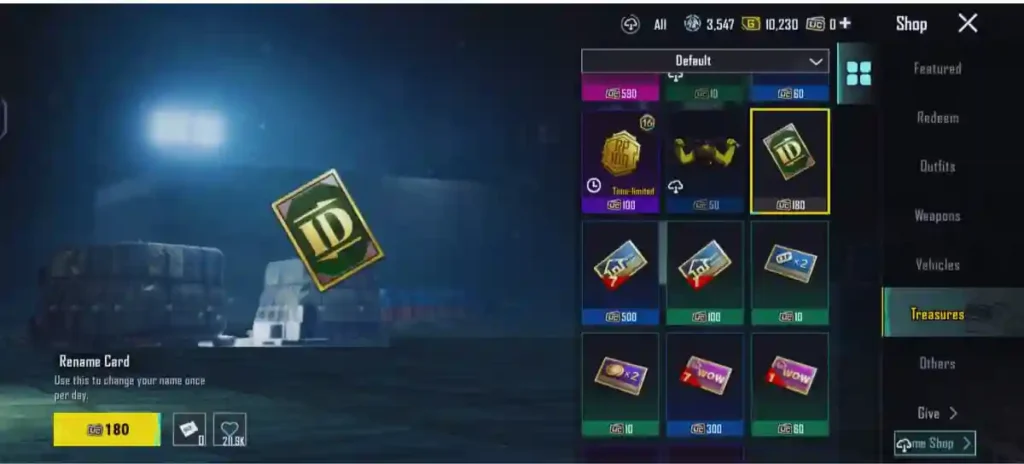
To change IGN in BGMI, you must have Rename Card. You cannot edit your in-game name without a Rename Card. To get a Rename Card, you can purchase it from the Shop using UC (Unknown Cash), or sometimes it is also available as a reward in in-game events.
How to Get Rename Card:
- Buy from Shop using 180 UC
- Earn from Royale Pass missions
- Get from events or return rewards
Sometimes, a Rename Card is also given as a reward for completing Royale Pass missions.
Steps to Follow
- Inventory → Rename Card
- Paste styled name
- Confirm
To change your IGN in BGMI, you need a Rename Card. You cannot change your name without it.
100+ Stylish BGMI Names (With Space)
Cool & Pro Names
- DarkㅤSniper
- GhostㅤRider
- AlphaㅤWolf
- ToxicㅤKing
- SilentㅤKiller
- DeadlyㅤShot
- RogueㅤX
- PrimeㅤHunter
- ShadowㅤOP
- VenomㅤStrike
Aesthetic Names
- MoonㅤAura
- LostㅤSoul
- BlueㅤVibes
- NeoㅤDream
- SoftㅤChaos
- NightㅤEcho
- PureㅤBliss
- FrostㅤWave
- CalmㅤStorm
- VoidㅤHeart
Stylish Names for Girls
- AngelㅤQueen
- LunaㅤRose
- PinkㅤVenom
- MysticㅤGirl
- FairyㅤSoul
- QueenㅤSlayer
- ShadowㅤDoll
- DivaㅤOP
- DreamㅤAngel
- SavageㅤLady
Funny BGMI Names (Indian Style)
- LootㅤKing
- CampㅤMaster
- NoobㅤOP
- BhaiㅤOP
- LagㅤPlayer
- BotㅤHunter
- ChickenㅤChor
- AWMㅤMiss
- GrenadeㅤFail
- RushㅤNahi
Mythological BGMI Names
- MahakalㅤX
- RudraㅤOP
- KaalㅤBhairav
- ArjunㅤAim
- YodhaㅤKing
- ZeusㅤFire
- HadesㅤWrath
- OdinㅤEye
- AresㅤWar
- TitanㅤLord
Clan Name Formats with Space
Simple & Clean
- XㅤClan
- OPㅤSquad
- DarkㅤArmy
- AlphaㅤTeam
Stylish Clan Tags
- 亗ㅤDarkㅤ亗
- ★ㅤGhostㅤ★
- 『Shadowㅤ』
- ⚡ㅤStormㅤ⚡
Pro Esports Style
- 4AM ㅤIND
- GOD ㅤOP
- TSM ㅤX
- RAWㅤ Force
Popular Symbols
★ ☆ 亗 么 × 〆 々 ツ
Aggressive Symbols
⚔️ ☠️ 🔥 💀 🗡️ ⚡
Stylish Borders
『 』 【 】 《 》 ꧁ ꧂
Premium Rare Symbols
𓆩 𓆪 𓂀 𒆜 𒆝
Name Ideas Based on Your Playstyle
| Playstyle | Name Examples |
|---|---|
| Rusher | RushㅤKing, EntryㅤFragger, PushㅤGod |
| Sniper | SilentㅤScope, OneㅤShot, HeadshotㅤX |
| IGL | MindㅤGamer, ZoneㅤMaster, CalmㅤLeader |
| Casual | ChillㅤOP, TimepassㅤKing, NoStressㅤPlay |
Rusher (Aggressive Player)
- Rush ㅤKing
- Entryㅤ Fragger
- Pushㅤ God
- Close ㅤCombat
Sniper (Long Range)
- Silentㅤ Scope
- One ㅤShot
- Dead ㅤAim
- Headshotㅤ X
IGL / Tactical Player
- Mindㅤ Gamer
- Zone ㅤMaster
- Silentㅤ Brain
- Calm ㅤLeader
Casual / Fun Player
- Chillㅤ OP
- Funㅤ Mode
- Timepassㅤ King
- NoStressㅤ Play
Device Compatibility Tips
- Android: All invisible characters work
- iOS: Use U+3164 or U+2060 for best results
- Low-end devices: Avoid rare symbols- may show boxes
Final Word
If you want a clean, stylish, and accepted BGMI name, the invisible Unicode space (ㅤ) is the best and safest method. Use it wisely, create a unique name, and enjoy being different.
Frequently Asked Questions
No. Normal spaces are not allowed.
Yes, invisible spaces are allowed and widely used.
Your device doesn’t support that Unicode character. Use Hangul filler only.
No, unless your name violates community rules.
Add extra symbols or numbers to make it unique.