
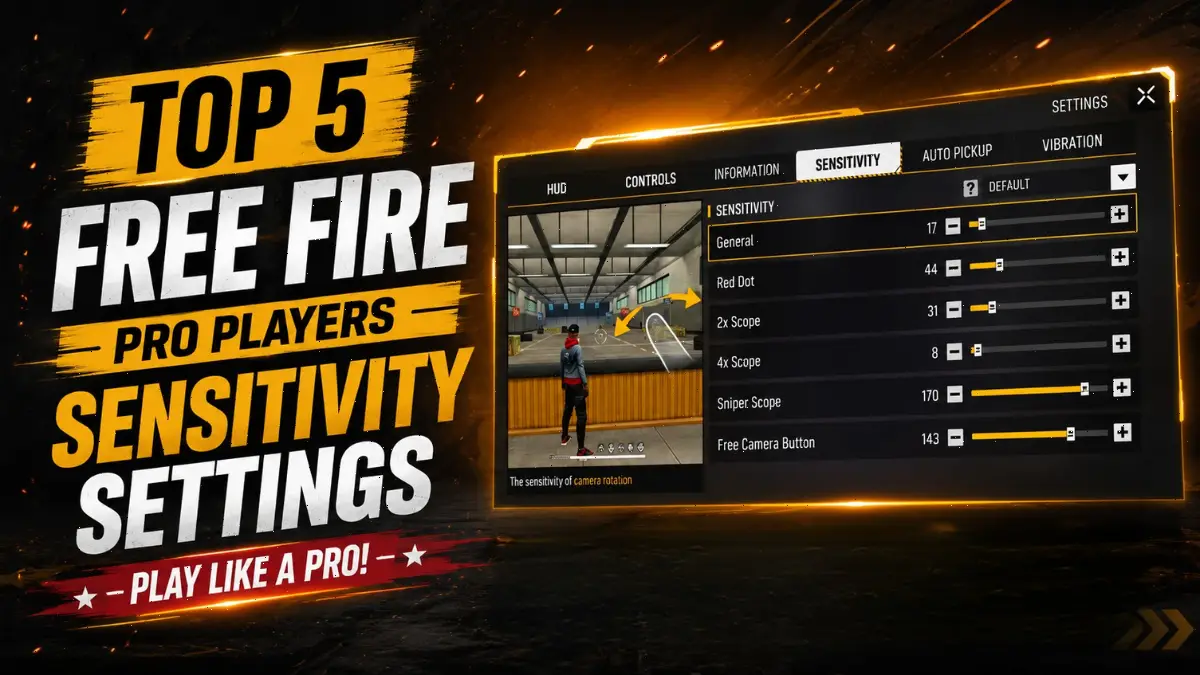
Every Free Fire player in India asked the same question after EWC 2026. How do pros land headshots so consistently? Indian teams like Apex Gaming turned heads at the tournament. Players like Shoto delivered insane accuracy during the Group Stage. The secret starts with sensitivity settings.
In this blog post, we will share the Sensitivity Codes of the top 5 Free Fire pro players in India. These players are known for their amazing gameplay, consistent headshots, and outstanding performance. If you want to improve your gameplay, these sensitivity settings can be very helpful.
What Are Free Fire Pro Player Sensitivity Settings?
In Free Fire, the Sensitivity Setting is one of the most important settings. Almost every movement in your gameplay, such as firing, running, sprinting, sliding, left-right movement, and throwing grenades, depends on your sensitivity settings.
It controls how fast your movements are and how accurate your aim feels. With the right sensitivity settings, you can make your gameplay smoother and perform better in matches.
Here is top 5 Pro Player Sensitivity Settings:
1. Shoto FF
Shoto played for Team Apex Gaming at EWC 2026. According to Liquipedia, 15 players from India took part in the tournament, and Shoto was one of them.
| Setting | Value |
|---|---|
| General | 17 |
| Red Dot | 44 |
| 2x Scope | 31 |
| 4x Scope | 8 |
| Sniper Scope | 170 |
| Free Camera Button | 143 |
His lower General sensitivity keeps the aim more stable, giving him better control. At the same time, his 170 Sniper Scope sensitivity helps him drag quickly and land flick headshots. If you play on a high-end device with 120 FPS, this setup is worth trying.
2. TG Mafia
TG Mafia uses a flexible range-based setup.
| Setting | Value |
|---|---|
| General | 75–85 |
| Red Dot | 80–90 |
| 2x Scope | 70–80 |
| 4x Scope | 60–70 |
| AWM / Sniper Scope | 50–60 |
| Free Look | 60–70 |
3. Total Gaming
Total Gaming uses a balanced mid-range setup with General at 100 and Red Dot at 90.
| Setting | Value |
|---|---|
| General | 100 |
| Red Dot | 90 |
| 2x Scope | 80 |
| 4x Scope | 65 |
| Sniper Scope | 50 |
| Free Look | 67 |
Total Gaming is Asia’s biggest gamer. If you are a beginner player and want movement like a pro player, this Sensitivity Code can be very useful, especially if you play on a low-end device. You can simply copy this setting and use it.
4. Gyan Gaming
His General is under 100, which keeps aim stable. His AWM Scope at 45 to 50 is deliberate and steady.
| Setting | Value |
|---|---|
| General | 100 |
| Red Dot | 90 |
| 2x Scope | 80 |
| 4x Scope | 65 |
| Sniper Scope | 50 |
| Free Look | 67 |
Gyan Gaming is a very popular Free Fire YouTube content creator from West Bengal. He plays Free Fire on both PC and mobile and is well known for his impressive gameplay. If you like his playing style, you should definitely try his Sensitivity Code.
5. Desi Gamers
Desi Gamers runs a high-sensitivity setup with General at 160 and Red Dot at 180.
| Setting | Value |
|---|---|
| General | 160 |
| Red Dot | 180 |
| 2x Scope | 170 |
| 4x Scope | 160 |
| Sniper Scope | 50 |
| Free Look | 67 |
High General and Red Dot let him spin fast and track enemies up close. His Sniper Scope is only 50, so he prefers steady shots over fast flicks.
How to Customize Pro Settings for Your Device?
Copying a pro player’s settings is just the first step. To get the best results, you should adjust the sensitivity based on your device, FPS, and thumb movement. The right way to do it is explained below.
- Pick one pro setting according to your gameplay style. Aggressive player should try Desi Gamers. Snipers should try Shoto and Balanced players should try Total Gaming.
- After applying the Sensitivity Setting, test it properly in the Training Ground with every Scope. Shoot at both moving and stationary targets. Also practice Drag Shots and Flick Shots. Pay attention to whether your aim is going too high or too low, then adjust the sensitivity accordingly.
- After testing the Sensitivity Setting in the Training Ground, adjust each sensitivity setting by +5 or -5. For example, if your aim feels too slow, increase the related slider by 5. If your aim feels too fast, decrease it by 5. For the best results, test each slider one by one and adjust it based on your gameplay.
- Always set your Sensitivity Setting based on your device and FPS. If you play at 120 FPS, you can use slightly higher Sensitivity settings. If you play on a low-end device, it is better to keep all Sensitivity options 10–15 points lower. Higher sensitivity becomes harder to control when you experience Frame Drops. If you often face Frame Drops or Lag, make sure to check out our Free Fire Lag Fix Guide.
Before judging any Sensitivity Setting, practice with it regularly for at least 5–6 days. It takes time to build muscle memory, so avoid changing your settings too often. If, after a few days, you feel that your control or movement is not as good as before, reset the Sensitivity Setting and apply your previous settings again. For many players, this fixes the problem.
I have experienced this myself several times. After applying a new Sensitivity Setting, the gameplay feels great for the first 5–6 days. Later, I sometimes notice issues with lag or movement. In many cases, resetting the Sensitivity Setting and applying the same settings again fixes the problem, and the gameplay feels smooth like before.
Final Word
Pro players’ Sensitivity Settings are only a starting point, not a magic code. Players like Shoto, Desi Gamers, Total Gaming, Gyan Gaming, and TG Mafia built their setups by playing hundreds of matches and practicing consistently. You will also need to fine-tune your Sensitivity Setting based on your own gameplay.
If you copy the Sensitivity Code of any of these five players, make sure to adjust it according to your device, FPS, and playing style. Then spend time practicing in the Training Ground. By testing and adjusting the settings properly, you can improve your gameplay, movement, and aim control.
For more Free Fire guides, redeem codes, and esports updates, bookmark Gaming News Lab.
Frequently Asked Questions
There is no single best sensitivity. For high-end phones, start with General 100 to 120 and Red Dot 90 to 100. For low-end devices, start with General 85 to 105 and Red Dot 50 to 60. Adjust by plus or minus 5 from there.
You can copy it as a starting point, but you should customize it. Pro players adjust based on thumb speed, screen size, and device FPS. Use their numbers as a base, then tune for your own setup.
Lower every slider by 10 to 15 points. Low-end devices drop frames, so high sensitivity causes overshooting. Keep General between 85 and 105. Keep Red Dot between 50 and 60. Test in Training Ground after each change.
It means adjusting any sensitivity slider by exactly 5 points up or down. If your aim feels too slow, add 5. If too fast, subtract 5. Do this one slider at a time until every scope feels comfortable.
Practice for at least 5 to 6 days before deciding if a setup works. Muscle memory needs time to adapt. If your aim still feels off after a week, reset to your old settings and try a different pro setup.







Freefire proxy server please give me please 🙏