
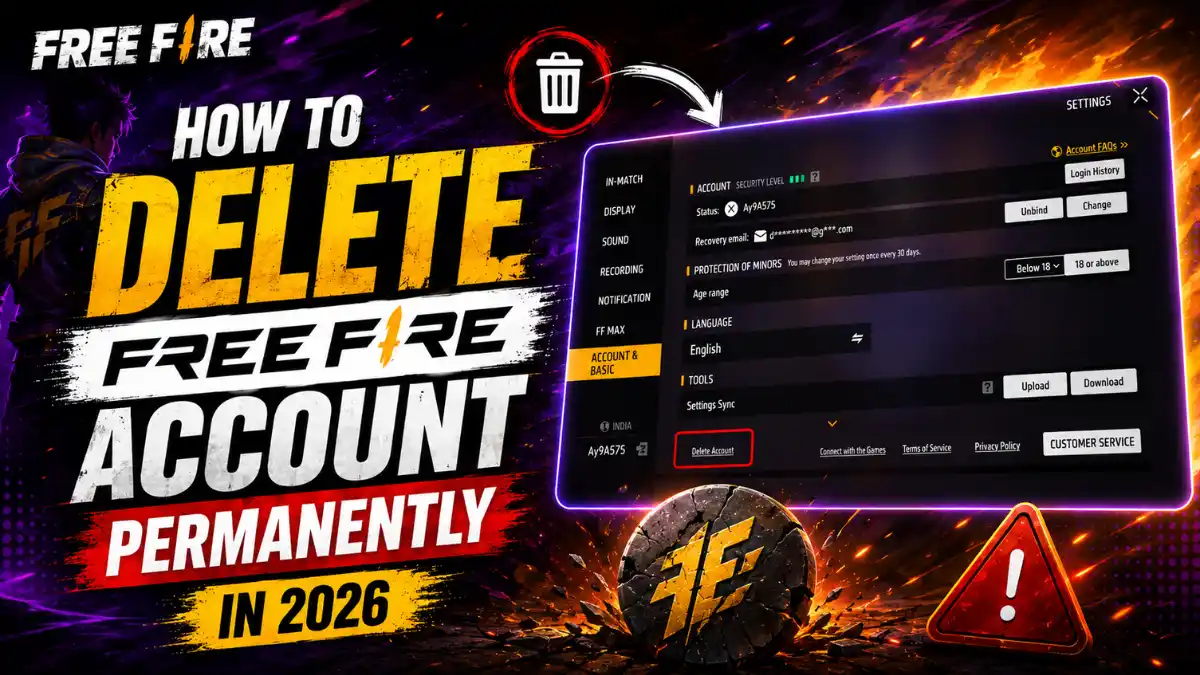
If you used to play Free Fire but have stopped playing now, then deleting your Free Fire account can be a good option. Garena provides an in game option to delete your account, which allows you to permanently delete it.
Uninstalling the game from your phone does not delete your account. Uninstalling the game only removes it from your phone, while your Free Fire account remains stored on Garena’s servers. So, if you want to permanently delete your account, this blog post is for you.
In this post, we will explain the step-by-step process of how to permanently delete a Free Fire account. We will also provide all the important information about what you need to delete the account through the official method, so you can delete your account safely and permanently.
Before You Delete: What You Will Lose Forever
Deleting a Free Fire account is permanent. Garena makes this very clear on their official deletion page. Once your account is gone, you cannot get it back.
Here is everything that disappears:
- All diamonds and in-game currency
- Character skins, weapon skins, and bundles
- Elite pass progress and rewards
- Game stats, rank, and achievements
- Clan membership and friends list
- All real-money purchases
Garena states that purchases for virtual currencies and items will be forfeited. They also note that some data may be kept longer for legal and safety reasons. You will not receive any refunds. If you have spent money on the game, think carefully before you proceed. You can still earn free diamonds if you decide to keep playing instead.
How Do I Officially Delete My Free Fire Account?
The deletion process can generally be started from the Free Fire account or Garena support system.
Step 1: Open the In-Game or Support Form
Open the game’s Settings section and look through the account & basic options. Tap on Delete Account
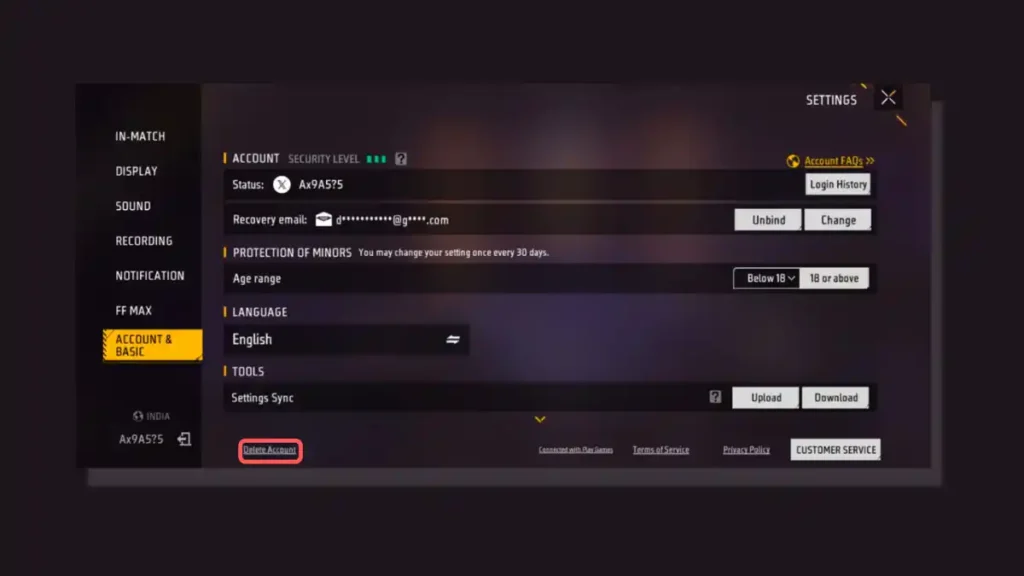
You can also visit the official Garena account deletion portal directly. Fill in your account details, region, and the reason for deleting the account. Provide all information honestly and clearly.
Step 2: Tap on Confirm
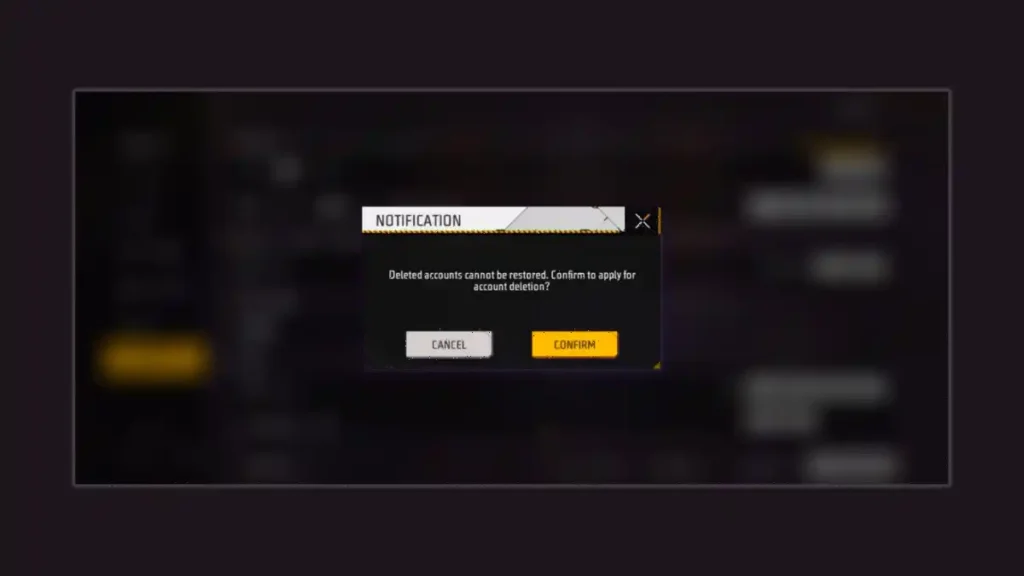
Step 3: Fill all information carefully
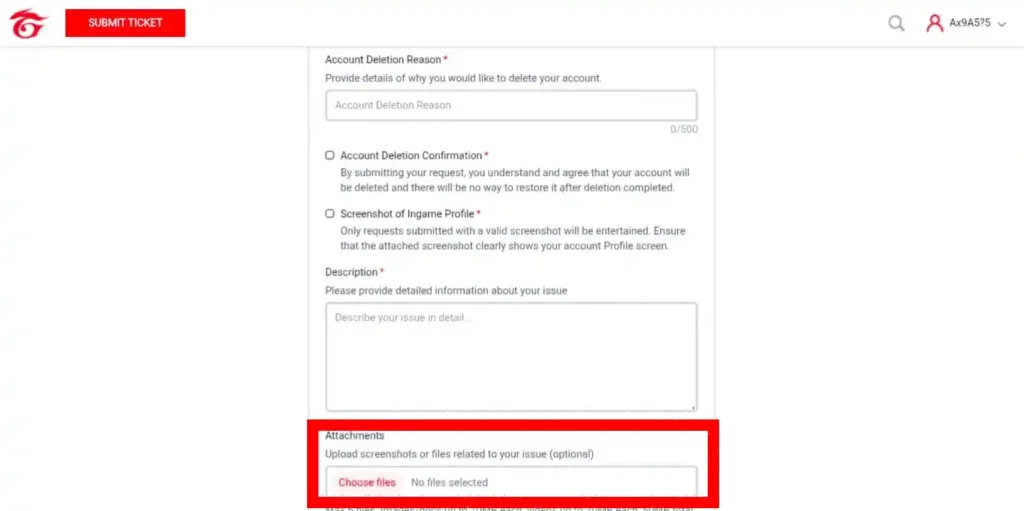
This is the most important step because you need to fill in all the necessary information about your account, such as your Account UID, Account Nickname, acceptance of the Privacy Policy, Account Deletion Reason, and a detailed description of your issue.
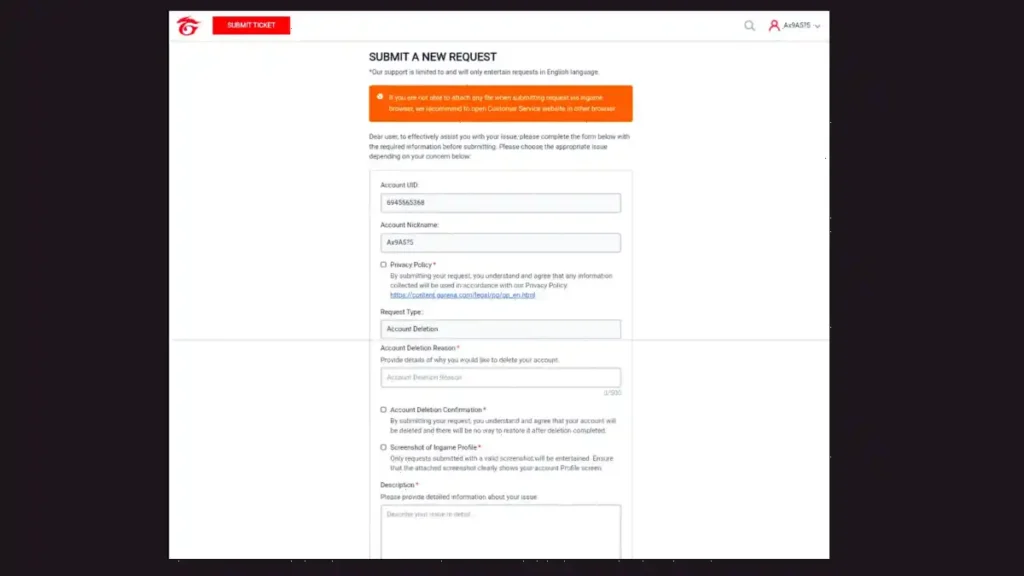
Step 4: Submit Profile Screenshot and Request
Garena will ask for a screenshot of your in-game profile. This proves you own the account. Make sure your UID, username, and level are clearly visible. Attach the screenshot to your support ticket.
Step 5: Confirm the Unique Code
After you submit the request, Garena sends a unique verification code to your registered email. Enter this code in the support portal to confirm the deletion. Without this step, your request stays pending. Check your spam folder if you do not see the email.
Step 6: Complete the 30-Day Offline Period
This is the most important step. Once confirmed, you must not log into Free Fire for 30 full days. Not even once. Opening the game, even accidentally, resets the timer. In a reddit discussion, Many players have reported that logging in during this period cancels the deletion entirely. Mark your calendar and delete the app from your phone to avoid temptation.
What Information May Be Needed for Account Deletion?
The information required can vary according to the deletion method, account type, and region.
Players should keep the following information available in case Garena requests verification:
- Free Fire UID
- In-game name
- Login method
- Registered email address, where applicable
- Relevant account details
- Screenshots or other ownership information, if requested
Garena states that it may require enough information to verify a user’s identity and understand the nature of a personal-data request.
A player should never share a Free Fire password, OTP, or other sensitive login credentials with an unofficial website or individual claiming to provide account-deletion services.
Does Deleting Free Fire Work Differently for Facebook, Google, Apple, and Guest Accounts?
Yes. While the core deletion request goes through Garena Support for all methods, you should also unlink Free Fire from Facebook, Google, or Apple ID settings first. Guest accounts have no automatic delete option and require direct contact with Garena Support.
Here is how each login method works.
Facebook: Go to Settings and Privacy, then Apps and Websites. Find Free Fire and remove it. Then submit the Garena deletion ticket.
Google: Open your Google Account, go to Security, then Third-party apps with account access. Revoke Free Fire’s access. Then submit the Garena ticket.
Apple ID: Go to Settings, tap your name, then Sign-In and Security. Find Free Fire under Apps Using Your Apple ID and stop using it. Then submit the Garena ticket.
Guest Account: Guest accounts are the hardest to delete. They are not tied to any email or social login. You must contact Garena Support directly with your UID and device details. Learn more about guest accounts in Free Fire before you start this process.
Unlinking alone does not delete your game data. It only removes the connection between your social account and the game. Your progress, diamonds, and skins stay on Garena’s servers until you complete the official deletion.
Can I Cancel My Free Fire Account Deletion or Recover It Later?
You can cancel the deletion anytime during the 30-day waiting period by simply logging back into your account. Once the 30 days pass and deletion is finalized, recovery is impossible. Garena states the process is irreversible.
If you change your mind during the waiting period, just open Free Fire and log in. The deletion request gets cancelled immediately. Your account returns to normal with all data intact.
If the 30 days have already passed, your only option is to start fresh. According to Xolvie, Some players try contacting Garena Support with purchase receipts and UID proof, but success is extremely rare. Garena’s official terms say deleted accounts cannot be recovered. If you accidentally requested deletion, contact support immediately with proof of ownership. The faster you act, the better your chances.
Free Fire Account Deletion vs Uninstalling Free Fire
| Action | Account deleted? | Game data affected? | Can the game be reinstalled? |
|---|---|---|---|
| Uninstall Free Fire | No | No permanent account deletion | Yes |
| Clear app data | No | Local device data only | Yes |
| Log out | No | No | Yes |
| Remove linked login access | Not necessarily | Account may still exist | Depends on login setup |
| Submit deletion request | Request begins | Potentially | Depends on deletion status |
| Permanent account deletion | Yes | Account data/services may be permanently lost | Old account may not be recoverable |
Regional Support Links and Common Rejection Reasons
Garena operates different support centers for different regions. Using the wrong portal can delay your request by days or weeks.
Here are the official regional support links:
- India:support-freefireind.garena.com
- Southeast Asia:support-freefire.garena.com
- Brazil:support-freefirebr.garena.com
For the latest updates on the Indian server, check our Free Fire India coverage.
Common reasons Garena rejects deletion requests:
- Incomplete or blurry profile screenshots
- Mismatched account details (wrong UID or email)
- Active ban or suspension on the account
- Pending transactions or chargebacks
- Duplicate deletion requests
Make sure your screenshot shows your full profile page. Double-check your UID and registered email. Clear any pending payments first. One clean, accurate request is better than three messy ones.
If your account is currently banned, you may still be able to delete it. However, the process takes longer because Garena verifies the ban status first. Check out our guide on how to submit a ticket to Garena correctly for more help with the support system.
Final Word
Now, You know the complete process for deleting a Free Fire account. However, if you have decided to delete your account and completed the deletion process, but change your mind within 30 days, realizing you shouldn’t have deleted it, you can recover the account by logging back in.
For players who only want a temporary break from Free Fire, logging out or uninstalling the game is the safer option.
Frequently Asked Questions
The official process takes 30 days after you confirm the deletion request. You must stay completely offline during this period. Logging in resets the timer or cancels the request.
No. Garena clearly states that all purchases, including diamonds and virtual items, are forfeited. You will not receive any refund after deletion.
Yes, but the process may take longer. Garena verifies the ban status before processing the deletion. You still need to submit a support ticket with your UID and profile screenshot.
Your deletion request gets cancelled immediately. Your account and all data remain intact. You would need to restart the deletion process from the beginning.
No. Garena requires all deletion requests to go through their official support system. Unlinking Facebook, Google, or Apple ID does not delete your game data.






Clear and useful tips here.