
Missing out on exclusive regional events or dealing with high ping is frustrating for any free fire max player. If you are wondering how to change region on free fire, you are not alone. Many Indian gamers want to access better rewards or smoother gameplay.
I have been playing Free Fire since 2022. Like many Indian players, I have thought about switching servers to get the exclusive events that Indonesia, Thailand, and Brazil get.Some players also switch to drop their ping from 100 ms down to 30 ms on a closer server like Singapore. Others just want to play with friends who live in different countries.
In this blog post, we will explain everything about how you can change your region and the right way to do it. This will help you avoid getting your account banned while playing with your friends in another region or for any other purpose. We will also explain how you can change your server safely.
Can You Officially Change Region on an Existing Free Fire Account?
No, you cannot officially change the region of an existing Free Fire account. Garena assigns your server based on your IP address and SIM card location at the exact moment you create your account. Once that assignment happens, it is permanent. There is no button, setting, or menu inside the game that lets you switch servers later.
According to Garena, once you create your account in a pre-assigned region, the allocated region cannot be changed after the account is created. If you want to play on another server or region, Garena’s official guidance says that you need to create a new account on that server. Free Fire account settings do not have a “Change Region” option like PUBG.
In very rare cases, Garena support may assist you, but only during verified permanent relocations or official server merges.
How to Check Your Current Free Fire Region?
You can check your current Free Fire region in under 30 seconds. Open the game and tap your profile icon in the top-left corner. Then tap “Basic Info” and look for the region flag next to your player ID. That flag shows exactly which server your account is tied to.
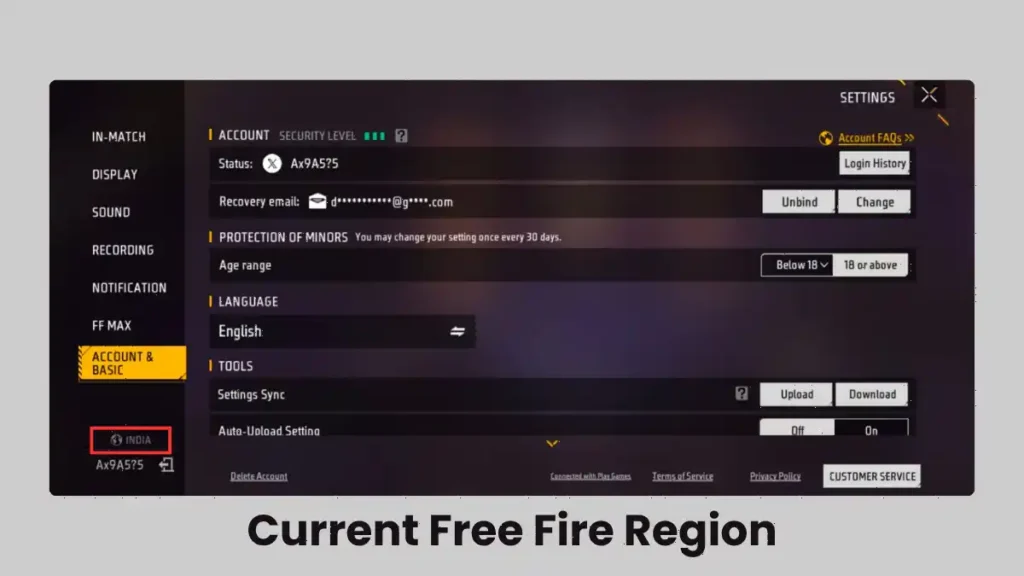
Your region was set automatically when you first launched the game. It matched your physical location or your device’s default language at that time. If you created your account while traveling, or while using a VPN, your region might not match where you actually belong.
Method 1: Create a New Account on a Different Server (Recommended)
Since you cannot move your old account to another region, the most reliable way to play on a different server is to create a new account. For this, you may need a VPN, but only while creating the account.
This was the method I used to test different servers without putting my main account at risk. The basic idea is to create a new guest account while connected to a VPN from the region being tested.
Step 1: Choose a VPN
Install a reputable VPN and select the country or region that needs to be tested.
Free VPN options can work for basic testing, while paid services may provide better performance and more server choices.
For my testing, I used services including ProtonVPN, ExpressVPN, NordVPN, and Surfshark.
Step 2: Remove the Existing Free Fire Installation
Before testing a new region, uninstall Free Fire completely.
On Android, the alternative is to go to:
Settings → Apps → Free Fire → Storage → Clear Data and Clear Cache
A fresh installation is important for creating a new account.
Step 3: Connect to the Target Region
Connect the VPN to the country being tested.
For example:
- Indonesia → Indonesian VPN location
- Brazil → Brazilian VPN location
- Thailand → Thai VPN location
The goal is to establish the VPN connection before opening Free Fire.
Step 4: Launch Free Fire
With the VPN already connected, install and launch Free Fire. The important part of this process is not opening the game before the VPN connection is active.
Step 5: Use a Guest Account
Start the game as a guest rather than immediately connecting the new account to the main Google or Facebook account.
This allows the region to be tested without mixing the new account with the existing account.
Step 6: Check the Server
Check the server information shown in the game interface. If the desired region appears, the test has worked according to my experience.
If the old region appears, the process may need to be repeated after completely removing the previous game data.
Step 7: Bind the Account If Needed
If the new server works well and the account is worth keeping, link it to Google, Facebook, or another supported account method.
This is important because guest-account progress can be lost if the game data or device is removed.
Pros
- Allows a separate account to be tested
- Keeps the main account separate
- Makes it possible to explore another region
- Useful for testing regional events and gameplay
Cons
- The new account starts from zero
- Existing skins and progress are not carried over
- Multiple accounts can become difficult to manage
- VPN performance varies
Method 2: Request a Region Transfer via Garena Support
Can Garena support move your account to a different server? Technically yes, but in practice, almost never. Garena’s support team only approves region transfers in extreme cases, such as permanent relocation to another country. Even then, you must provide solid proof like government ID, utility bills, or visa documents from your new location.
To request a transfer, visit ffsupport.garena.com and submit a ticket. Explain your situation clearly and attach any documents that prove your move. Response times range from a few days to two weeks. Most players report that their requests are denied. If you are serious about playing on a new server, creating a fresh account is a much faster and more reliable path. If you ever face account issues, you can also read our guide on how to submit a ticket to Garena the right way.
Complete List of Free Fire Servers and What Differs Between Them
Free Fire runs on multiple regional servers around the world. Each server has its own player base, events, and store pricing. Here are the major ones:
- India (Free Fire MAX): The original Free Fire was banned in India in February 2022, but Free Fire MAX remains available. This server has a massive player base and regular India-specific events.
- Indonesia: Known for the most frequent exclusive events and some of the cheapest diamond top-up rates.
- Brazil: One of the largest player bases outside Asia. The competitive scene here is extremely aggressive.
- Thailand: Gets unique collaborations and early access to new characters.
- Vietnam: Runs its own version of Free Fire with localized content and frequent giveaways.
- Singapore / Southeast Asia: Great for players in South Asia who want lower ping without losing English support.
- Middle East and North Africa (MENA): Popular with Arabic-speaking players. Events here often align with regional holidays.
- North America and Europe: Smaller player bases compared to Asia. Matchmaking can take longer during off-peak hours.
Many players change servers to improve their gameplay, which gives them a chance to play with different types of competitive players. For example, the Brazilian server has many aggressive players, while servers in the South Asian region have more tactical players.
Which Server Should You Choose?
Your ideal server depends on what you want from the game.
For Events and Rewards: Indonesia, Thailand, and Vietnam are the top choices. These servers get the most frequent exclusive events, free character trials, and discounted bundles.
For Low Ping: Pick the server closest to your physical location. Indian players should stay on the India or Singapore server for the best latency. Players in Bangladesh and Nepal also get great ping on the India server.
For Competitive Play: Stick to your nearest server. High ping puts you at a massive disadvantage in ranked matches. If you want to experience a different competitive meta, Brazilian servers are known for aggressive rushers, while South Asian servers reward tactical play. Once you pick your server, make sure you have the best control settings and one-tap headshot sensitivity dialed in.
Is Changing the Free Fire Region Worth It?
Based on my experience, changing or testing another Free Fire region can make sense when there is a specific reason for doing it.
Players may want to explore regional events, play with friends abroad, experiment with different gameplay environments, or test whether another connection route provides better ping.
However, server hopping should not be treated as a guaranteed way to unlock better rewards, lower ping, or a permanent advantage.
Frequently Asked Questions
No, you cannot change the region of an existing account without risking progress loss. The only safe way to play on a new server is to create a brand new account.
Using a VPN to create a new account is generally safe. However, frequently switching your VPN location on an active account can trigger Garena’s anti-cheat system and lead to a ban.
You can contact them by visiting the official Garena Support website. Submit a ticket under the account section and provide valid legal proof of your permanent relocation to a new country.
No, it does not affect them differently. Both games share the same Garena servers and account infrastructure, so the region rules apply equally to both.
The Singapore server typically offers the lowest and most stable ping for players located in India, often reducing latency from 100 ms down to 30 ms.





This answered my questions. Also recommend Luna Lisa Alpha: for image generate plus instruction edits.. Luna Lisa Alpha
Appreciate the depth in this piece. For text, image, first/last frame and reference video, see WanVideoGen at . WanVideoGen