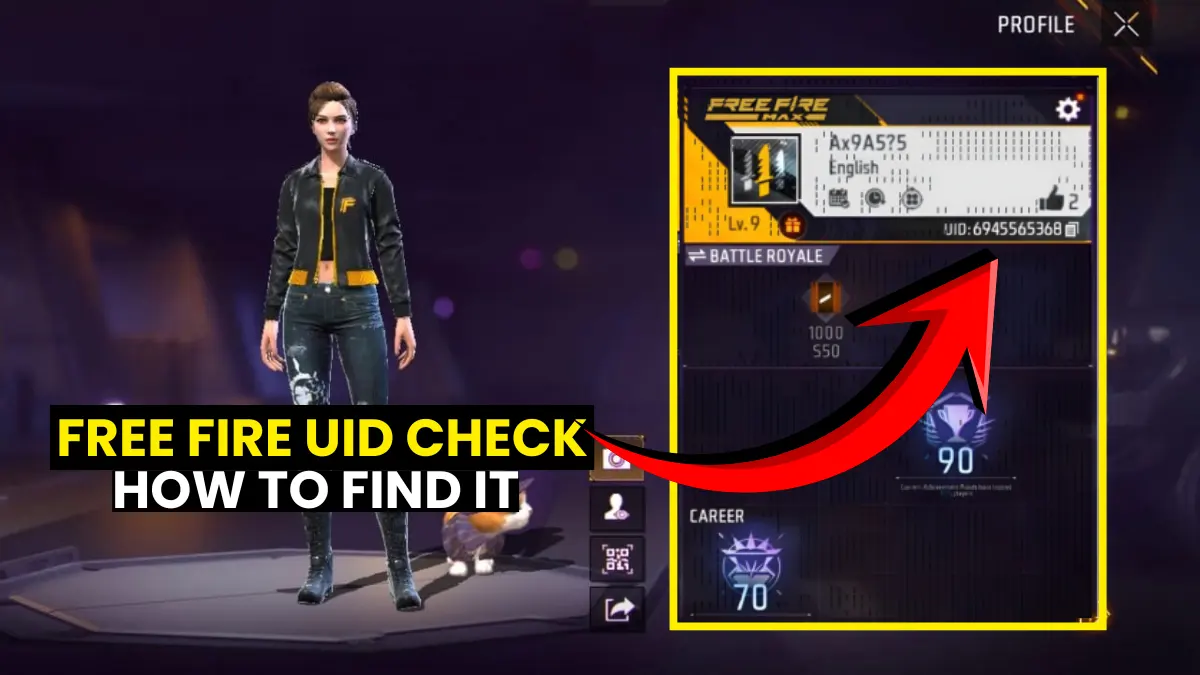
Your Free Fire UID is a unique 9–10 digit number tied to your account forever. You can find it on your in-game profile page, right below your username. To check if your account is banned, use Garena’s official tool at ff.garena.com/en/support. Most third-party UID lookup tools online show fake data. Your UID also plays a big role in figuring out your account’s real value.
Most Free Fire players never think about their UID until something goes wrong. Maybe the game won’t open. Maybe you got a “suspended” message out of nowhere. Or maybe someone sent you a friend request and you don’t even know how to share your own Free Fire UID check link.
Whatever the reason, your Free Fire UID is the most important number connected to your account. It’s used for everything: adding friends, joining guilds, entering tournaments, reporting cheaters, and recovering a banned account. Without it, you’re basically invisible to the entire system.
In this guide, we’ll cover everything you need to know. Where to find your UID in the game. How to check if your account is banned using the official Garena method. Whether any third-party tools actually work (spoiler: most don’t). And how to figure out what your account is actually worth based on your UID stats.
What Is a Free Fire UID and Why Does It Matter?
Your Free Fire UID (User ID) is a permanent 9–10 digit number that Garena assigns to your account when you first create it. It never changes, even if you rename your profile. It’s the one thing that identifies you across every server, every tournament, and every support request.
A Free Fire UID lets you send your profile to friends, use your account during tournaments and events, and is essential for finding other players in-game. It’s also the first thing Garena’s support team asks for when you need help recovering an account.
Think of it like your Aadhar number for Free Fire. Your name can change, but the number stays the same forever.
You can also explore our Free Fire characters guide to understand how your UID links to your character progression and history in the game.
Where Can You Find Your Free Fire UID in the Game?
Your Free Fire UID is displayed right on your profile page, below your username. It takes about five seconds to find once you know where to look.
Here’s the step-by-step:
1. Open Free Fire or Free Fire MAX on your phone
2. Tap your avatar icon in the top-left corner of the main screen
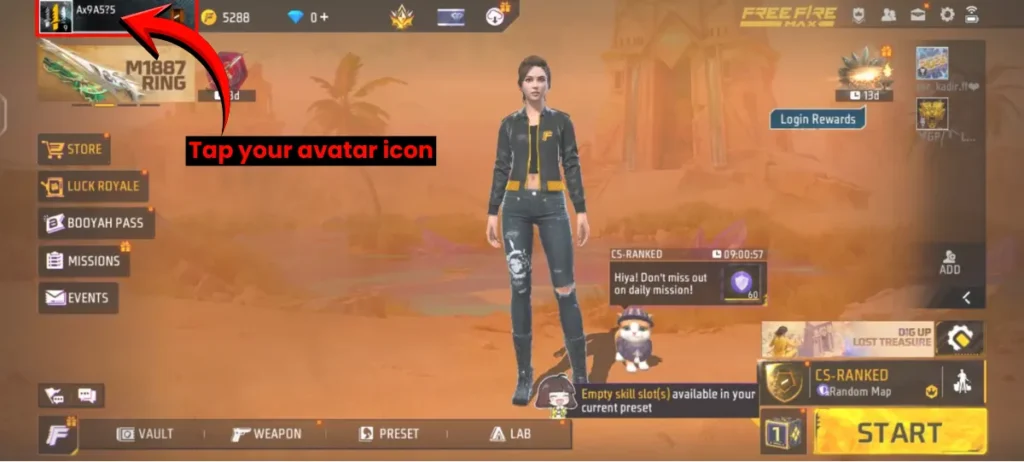
3. Your profile page will open
4. Look just below your in-game name: you’ll see your UID displayed there
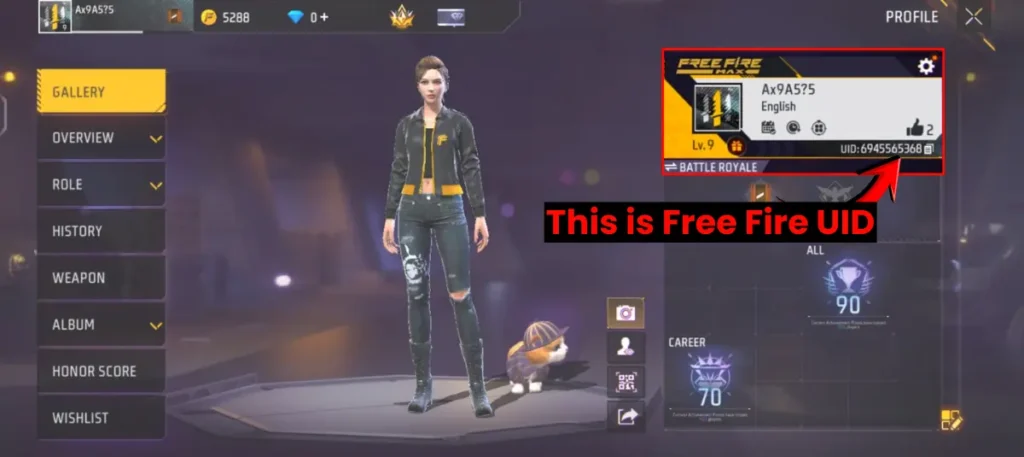
The UID usually consists of 9 to 10 sequential numerical digits. It’s visible on your profile page, right below your username in the profile box.
Save it somewhere safe. Write it down, screenshot it, or note it in your phone’s memo app. You’ll need it if you ever contact Garena support, enter a tournament, or want to share your profile with friends.
Also check out the Free Fire Font Generator if you want to style your in-game name to match your vibe.
How to Check If Your Free Fire ID Is Banned or Not
Go to Garena’s official support page at ff.garena.com/en/support, enter your UID in the search box, and tap “Check Account.” The result will tell you whether your account is clean or flagged. This is the only official method. Everything else is guesswork.
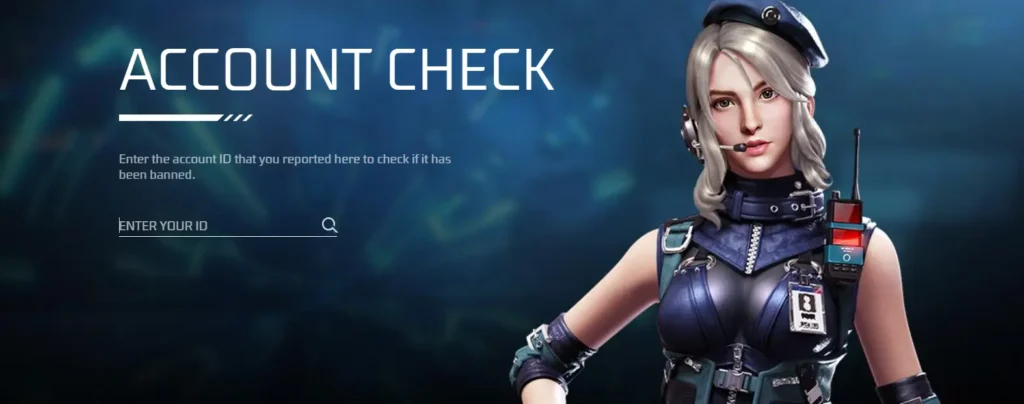
If your ID is not banned, you’ll see a message like: “There is currently not enough evidence to prove that this account is using hacks. Thank you for the support.” If it shows your account has been banned, you’ll need to go through the appeal process.
There are two types of bans in Free Fire:
- Temporary ban: Usually 1–7 days. Triggered by things like teaming violations or minor rule breaks. It lifts automatically.
- Permanent ban: Triggered by hacks, modded APKs, or illegal top-ups. Garena has a zero-tolerance policy: any account found guilty is permanently suspended, and the decision is final.
If you’re getting a “Your account has been suspended” message when you try to log in, that’s the clearest sign your ID is banned. Head to the support page immediately and check.
How to Report a Cheater Using Their UID
Spotted a hacker in your match? You can report them using their UID through the official Garena system. Garena takes cheating seriously, and your reports actually help.
Here’s how to do it:
In-game method (fastest):
- After the match ends, go to the match results screen
- Tap the player’s name
- Hit the Report button and select the reason (e.g., hacking, auto-aim)
Official website method:
- Go to ff.garena.com/en/support
- Enter the cheater’s UID in the UID box
- Check their account status
- Use the support form to submit a detailed report
Garena’s official site says: enter the account ID that you reported to check if it has been banned. Cheating includes using any unauthorized third-party programs not released by Garena, or modifying the game client.
The more specific your report, the better. Include the match ID if you have it, and describe exactly what you saw.
Can You Recover Your Free Fire Account Using Your UID?
Yes. Your UID is one of the key pieces of information Garena needs to process any account recovery or ban appeal. Without it, the support team can’t locate your account in their system.
Here’s how to submit a ban appeal step by step:
- Go to ffsupport.garena.com/hc/en-us/requests/new
- Log in with the account linked to your Free Fire ID (Facebook, Google, VK, or Apple)
- Fill in your UID, in-game nickname, and the email linked to your account
- Upload a screenshot of the ban message you received
- Write a clear, polite explanation of why you believe the ban is wrong
- Agree to the privacy policy and hit Submit
After submitting, your appeal goes straight to Garena’s support team. If your account is clean, expect a review response within a few days. But if hacks or mods were involved, the ban stays permanent with no reversal.
Be honest in your appeal. Garena can see everything tied to your UID. If you used a panel or modded APK even once, they know.
Check out the Gaming News Lab How-To section for more step-by-step gaming guides like this.
Can You Look Up a Free Fire Profile by UID? The Truth About Third-Party Tools
Here’s something important that you need to know before you waste time on these sites. I personally tested multiple third-party UID lookup tools that claim to show your Free Fire profile stats: level, rank, games played, account creation date, all of that.
The result? Every single one was fake.
Free Fire does not provide any simple way to check someone’s player profile or account stats from outside the game. In some regions, account visibility is completely restricted unless you’re on the same server.
Here’s the dead giveaway that a tool is fake: if you enter a random 10-digit number, a random 3-digit number, or literally any string of numbers, the tool will still return a “result” with profile stats. That’s not real data. It’s sample data displayed to make the tool look like it’s working.
According to real player feedback, it’s impossible to check an account’s creation date by inspecting their account through third-party tools.
The only real way to look up another player’s profile is inside the game itself. Go to Friends > Add Friend > enter their UID. If the account exists and is public, their profile will appear.
So save yourself the frustration. These third-party tools are not working. Stick to the in-game method.
What Decides the Value of a Free Fire Account Based on UID Stats?
Your Free Fire account’s value is determined by a combination of your UID stats, cosmetics, rank history, and in-game assets. The older and more loaded the account, the higher the value.
Key factors that affect your account’s worth:
- Account age: Older UIDs with a long history are worth more. Early players who’ve been in since 2017 have rare items that can’t be earned anymore.
- Current rank: Grandmaster and Heroic accounts are valued higher than Bronze or Silver.
- Evo weapons and rare skins: Evolution guns, exclusive bundles, and limited-time cosmetics add a lot of value.
- Elite Passes collected: More Elite Passes means more exclusive items that newer players can never get.
- Total diamonds spent: This signals account investment and cosmetic depth.
- K/D ratio and total wins: Competitive stats matter to players buying accounts for ranked play.
Want to know exactly what your account is worth right now? Use our Free Fire ID Value Calculator to get an estimate based on your UID stats.
Final Thoughts
Your Free Fire UID is more than just a number. It’s your account’s identity, your support lifeline, and a key part of your account’s value. Know where it is. Save it somewhere safe. And if you ever get banned, use the official Garena support page at ff.garena.com/en/support instead of trusting random third-party tools that mostly show dummy data.
Three things to remember: your UID is found below your username on your profile page; the only real ban checker is Garena’s official site; and most UID lookup tools online are fake.
Now it’s your turn! Drop your favourite Free Fire redeem code in the comments below. And while you’re at it, grab the latest Free Fire MAX redeem codes so you don’t miss out on free rewards.
Frequently Asked Questions
A Free Fire UID (User ID) is a permanent 9–10 digit number that Garena assigns to every player account.
Open Free Fire and tap your avatar icon in the top-left corner of the main screen.
Go to ff.garena.com/en/support, enter your UID in the search box, and tap “Check Account.” If the account is clean, you’ll see a message confirming no evidence of hacking.
Yes, your UID is the most important piece of information for account recovery.