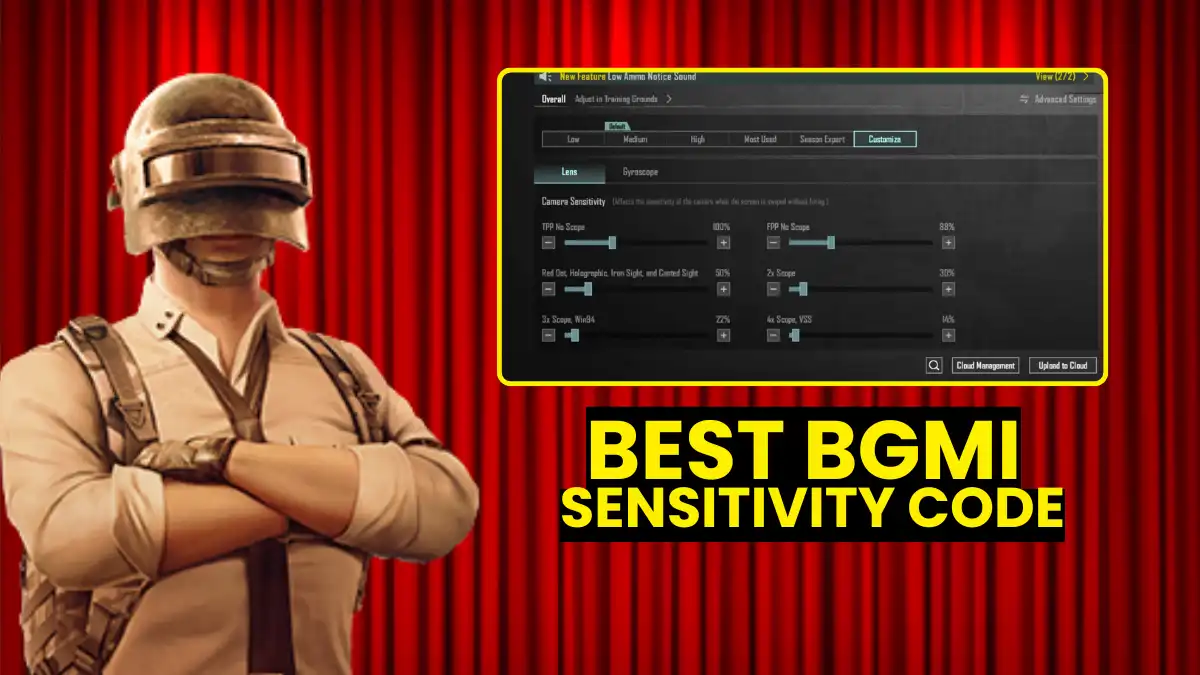
A BGMI sensitivity code is an importable 19-digit string that loads Camera, ADS, and Gyroscope settings instantly. No single code works for everyone, but community-tested codes like 7307-1085-6780-4282-435 (gyro) and 6983-8762-7023-5848-120 (non-gyro) are solid starting points for zero-recoil sprays. Pick the code that matches your playstyle, paste it in Settings > Sensitivity, and spend 15 minutes in Training Ground doing small 5-10% tweaks. That’s your path to laser-accurate sprays in 2026.
You just watched a pro player drop 12 kills in one match. His M416 spray was clean. Bullets stayed on target. Zero wobble. You copy his best BGMI sensitivity code, paste it in, and load into Training Ground. The gun still jumps. Nothing changed.
Here’s the truth: a code alone doesn’t fix your aim. But a wrong code makes everything harder. And most players are running the wrong code for their setup.
This guide gives you the best codes for every finger layout, explains exactly what these codes do to your gun feel, and includes the exclusive Finger Claw Sensitivity Matrix that no other site bundles together. If you want to increase your BGMI rank faster, sensitivity is the first thing you need to lock in.
What Is a BGMI Sensitivity Code?
A BGMI sensitivity code is a 19-digit importable string that stores your complete Camera, ADS, and Gyroscope sensitivity values on Krafton’s cloud. Anyone who pastes it into Settings > Sensitivity instantly loads those exact values, skipping all manual slider adjustment. It’s basically a save file for your entire aim setup.
The code covers four sensitivity categories: Camera Sensitivity (how fast your screen moves when you swipe), ADS Sensitivity (recoil correction while firing without gyro), Gyroscope Sensitivity (tilt-to-control using your phone’s motion sensor), and ADS Gyroscope (gyro-based recoil control while aiming down sights).
Codes were designed so players could share setups and back up their own settings. Pro players and content creators share their codes publicly, which is why you can import a Conqueror player’s full settings in under 30 seconds.
One important thing to know upfront: a sensitivity code changes how fast your aim moves, not the actual recoil physics. The “zero recoil” effect comes from dialing ADS and gyro values to match your device and playstyle through practice. Any website claiming “auto headshot” or “instant zero recoil” from a code is either misleading you or straight-up running a scam.
Best BGMI Sensitivity Codes 2026
Here are the top working codes tested by pro players and popular creators. Use gyro codes if your phone supports tilt control. Use non-gyro codes if you play thumbs-only.
Gyroscope Codes
| Code | Best For | Works Great On |
|---|---|---|
| 7307-1085-6780 | All-round balanced spray | M416, SCAR-L, mid-range |
| 4282-435-7238 | Long range control | 6x sprays, AKM |
| 4245-4286-7096 | Budget Android phones | Smooth, low shake |
| 036-7527-1413 | Very smooth recoil | 6x M416 specifically |
| 2691-7206-9691 | 4-finger claw players | High control sprays |
Non-Gyro (Touch Only) Codes
| Code | Best For | Works Great On |
|---|---|---|
| 6983-8762-7023 | Beginners, vertical recoil | All ARs |
| 5848-1201-7571 | Stable close-range | Redmi, Samsung mid-range |
| 6708-4489-3563 | Accurate mid-range | Overall balanced |
| 7027-1200-6438 | Accurate mid-range | Overall balanced |
| 2495-6408-05 | Accurate mid-range | Overall balanced |
Codes like 7307-1085-6780-4282-435 are described as very balanced and smooth, working great for M416 and SCAR-L.
All of these are verified working as of early 2026. That said, codes are cloud-based and tied to the original player’s account. Codes can reset at any time if the creator updates or deletes their layout, so always save a screenshot of your settings before importing something new.
Want to see how the most influential BGMI esports players run their sensitivity setups? Pro players rarely stick with one code forever. They use these as a base and fine-tune constantly.
Gyro or Non-Gyro: Which BGMI Sensitivity Code Should You Use?
Gyroscope codes give superior recoil control by letting you tilt your phone to correct bullet spray, which is why they dominate at pro and Conqueror level. Non-gyro codes suit thumb players on low-end Android or anyone who can’t comfortably hold and tilt their phone mid-fight. The skill gap between gyro and non-gyro narrows significantly with enough practice on either setup.
Here’s a quick breakdown:
| Feature | Gyroscope | Non-Gyroscope |
|---|---|---|
| Recoil Control | Excellent (tilt to correct) | Good (ADS only) |
| Device Need | Mid-range or higher phone | Works on any device |
| Learning Curve | Steep (2–4 weeks) | Low |
| Best Layout | 3-finger or 4-finger claw | 2-finger thumb |
| Scope Accuracy | Better for 4x/6x | Better for 2x/3x |
Gyroscope offers better recoil control for most players, but touch-only settings can work well if tweaked properly. The key variable is your phone.
If you’re on a high-end Android or iPhone, full gyro codes work better because your refresh rate (90Hz/120Hz) gives the motion sensor the speed it needs to respond. Budget phones at 60Hz can struggle with full gyro, making the screen feel floaty. For those devices, scope-on gyro (gyro activates only when you ADS) is the sweet spot between control and stability.
High-end phones work great with gyroscope because tilt control gives more accurate recoil handling. If you’re on a budget Android, start with a non-gyro code and focus purely on ADS calibration.
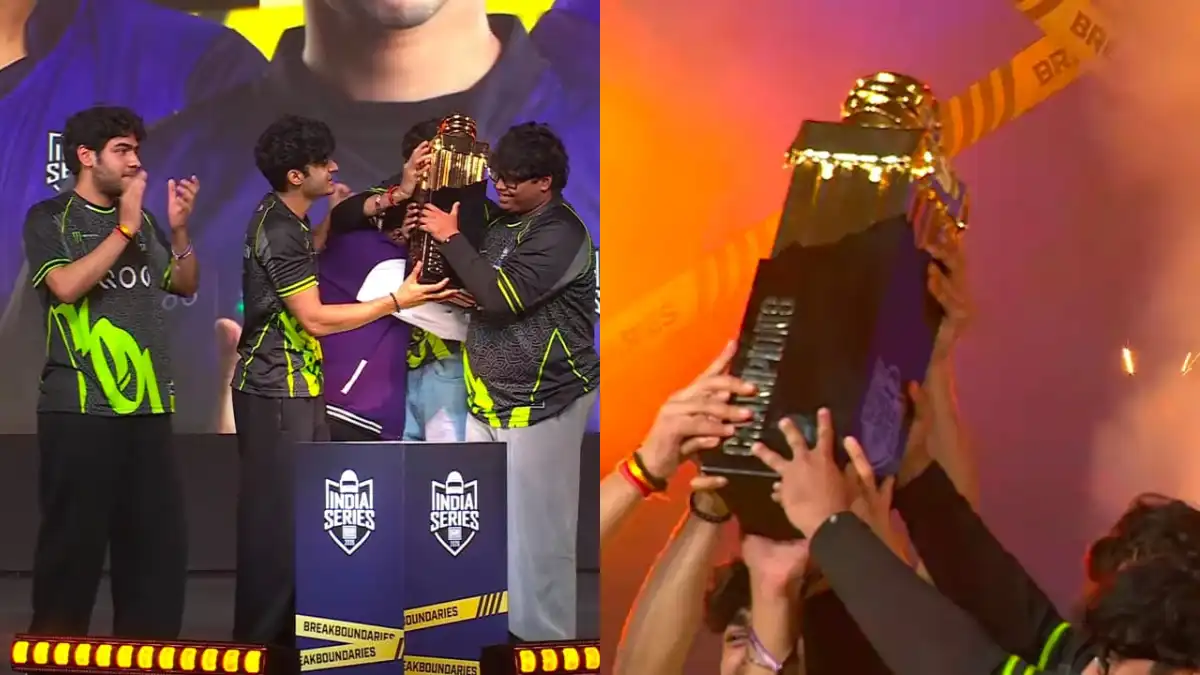
The BGMI Rising tournament scene has proven that both gyro and non-gyro players can compete at the highest level. It comes down to how well-calibrated your settings are, not just which type you use.
Finger Claw Sensitivity Matrix: Match Your Code to Your Finger Layout
Most guides give one code for everyone. But your finger count changes what “best” even means. A 4-finger claw player controls the screen with more points of contact, which means they can handle lower ADS sensitivity and still react fast. A 2-thumb player needs slightly higher values to compensate.
Higher finger counts often mean faster camera response without losing control, and the same code can feel completely different depending on your layout.
This is the table no competing site has. It bundles the right sensitivity code and the right HUD layout approach for your specific finger setup.
The Finger Claw Sensitivity Matrix
| Finger Setup | Recommended Code | ADS Feel | HUD Layout Tip | Best For |
|---|---|---|---|---|
| 2-Thumb (Beginner) | 6983-8762-7023-5848-120 | Medium-High | Wide fire buttons, big scope buttons | Learning spray patterns |
| 3-Finger (Standard) | 7128-4471-2299-3401 | Balanced | Add a crouch button near fire zone | Ranked pushes, versatile |
| 4-Finger Claw | 1-7571-6981-9834-2795-805 | Lower ADS, higher gyro | Peak buttons on left side, scope on right | Aggressive close-mid range |
| 4-Finger + Full Gyro | 7128-7740-6188-9902 | Low ADS, medium gyro | Minimize left-side clutter | High-level competitive |
| 6x/8x Sniper Setup | 7128-6112-0833-4410 | Very low scope ADS | Dedicated scope button near thumb | Squad wipe from range |
The key rule: if you’re adding more fingers, drop your ADS sensitivity by 15-20% compared to what a 2-thumb player uses. Your extra fingers already give you the speed. The lower sensitivity gives you the control.
Check out the top BGMI pros in India to see which finger layouts the best players in the country actually use.
Does a Sensitivity Code Actually Reduce Recoil to Zero?
No sensitivity code can reduce recoil to zero permanently. Recoil is built into BGMI’s gun physics. Every weapon has a fixed spray pattern programmed by Krafton. A code adjusts how fast your screen moves, not how the bullet physics behave.
“Zero recoil” is a misleading label that’s become popular in the BGMI community. In BGMI, zero recoil means good sensitivity which allows a player to have control and precision while spraying bullets. The gun still pulls upward. The right settings just make it easier for your hands and fingers to pull it back down.
So how much does a good code actually help?
- 2-thumb beginners: 20-25% improvement in spray consistency with the right code
- 3-finger players: 15-20% improvement, mostly in mid-range stability
- 4-finger claw + gyro: Up to 30% improvement when the code matches the layout
The reason players feel a huge difference after a good code is muscle memory, not magic. Once your ADS and gyro values stop fighting each other, your hands learn the correct drag pattern faster. That’s what people call “zero recoil.” It’s trained control, not automatic suppression.
It’s also worth knowing these codes are completely safe to use. They use BGMI’s own built-in sharing system. There’s no risk of a ban. If you want to understand how Krafton monitors the game, the BGMI anti-cheat system explains it in full.
How to Import Your BGMI Sensitivity Code
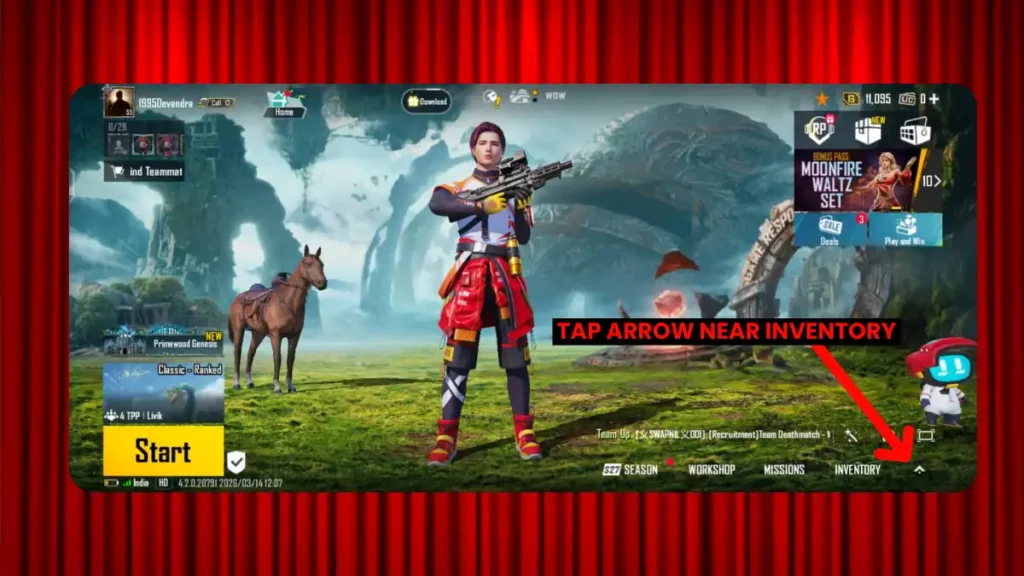
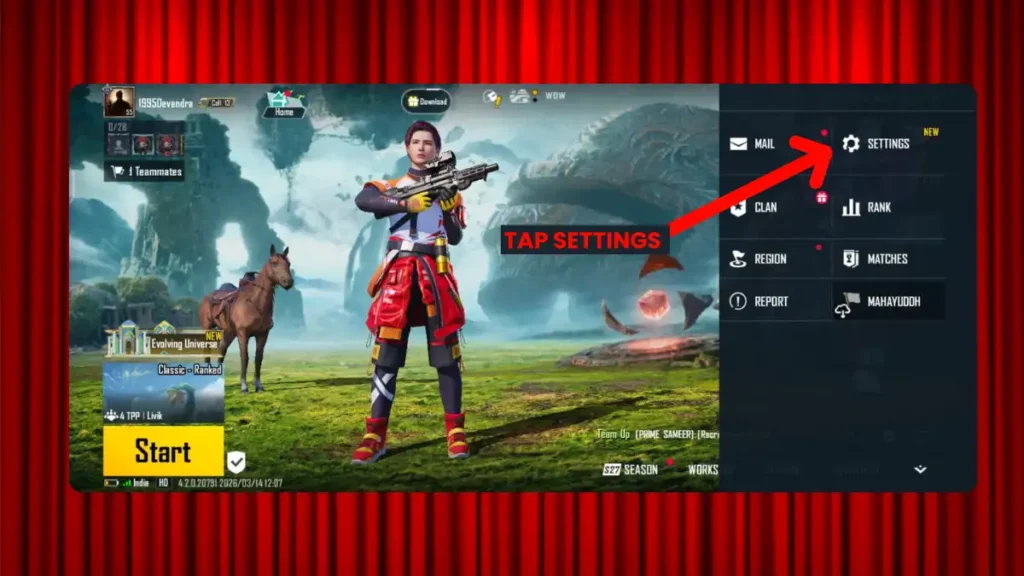
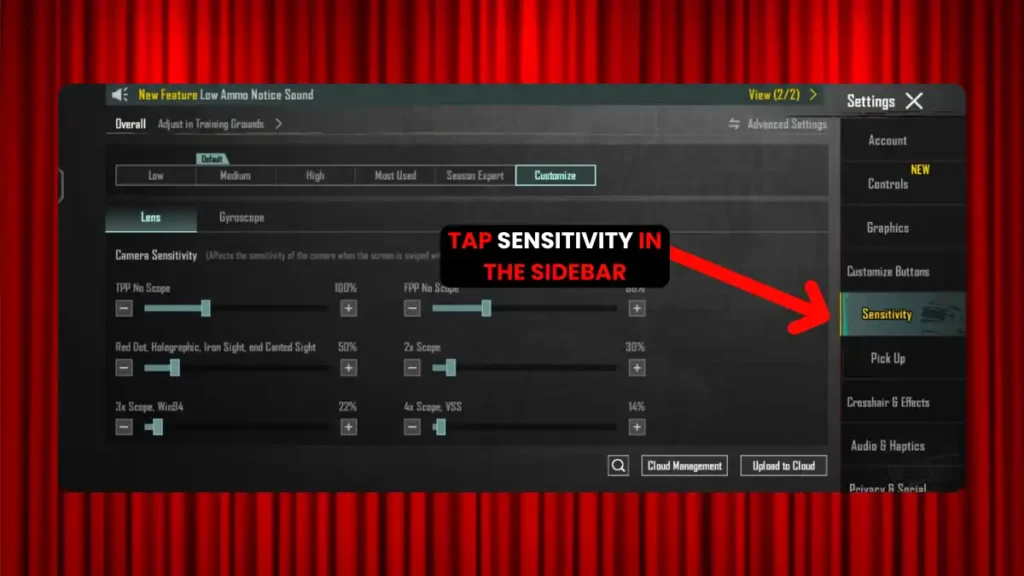
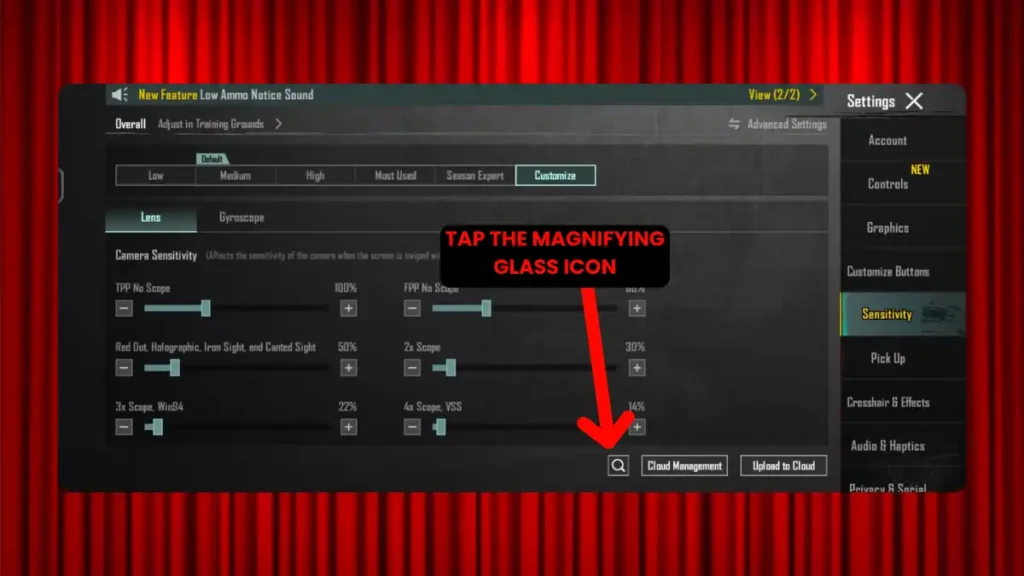
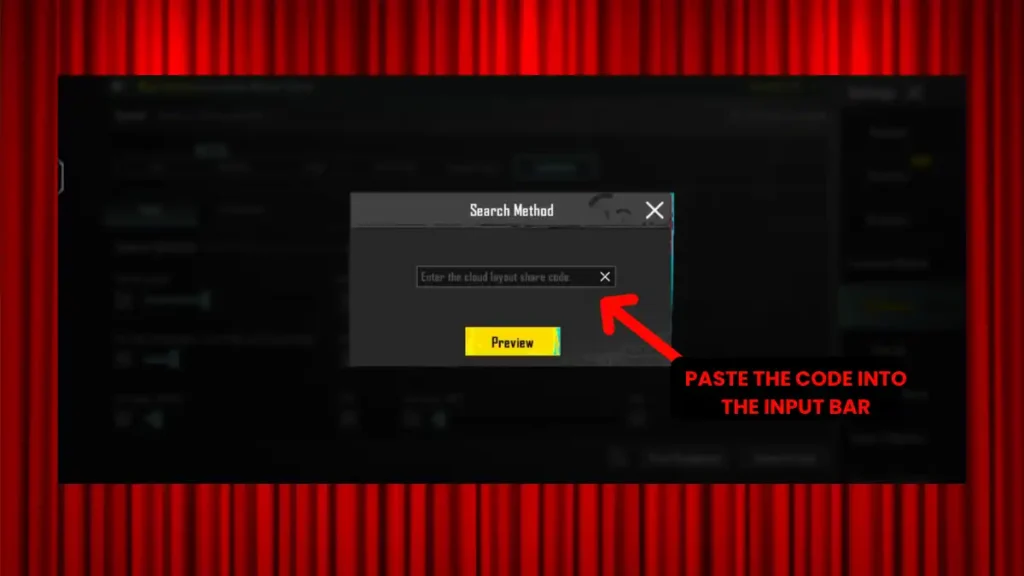
Importing a sensitivity code takes under one minute. Copy the code you want, open BGMI, tap the small arrow near your profile icon, then go to Settings. Tap the Sensitivity tab on the sidebar. Look for the magnifying glass icon at the bottom of the screen, usually next to the Cloud Management button. Tap it, paste your code into the input bar, and hit Search. A preview will load showing all your values. Check everything looks right, then tap Apply.
Here’s the process step by step:
- Copy your desired code to your clipboard
- Open BGMI and Tap arrow near Inventery
3. Tap SETTING in the sidebar
4. Tap Sensitivity in the sidebar
5. Tap the magnifying glass icon at the bottom of the screen
6. Paste the code into the input bar
7. Preview the settings, then tap Apply
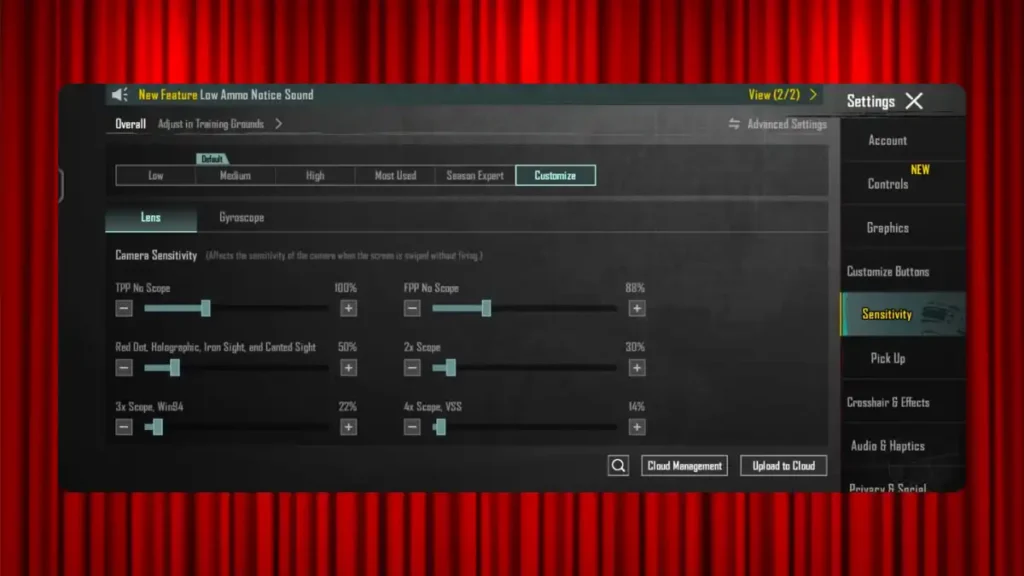
To share your own code, go to the same Sensitivity tab and tap the Upload to Cloud button. The game generates your unique code, which you can then copy and send to anyone.
Step-by-step import process confirmed via BGMIkhelo and FantasyKhiladi’s import guide.
If you’re new to the game, learning how to rank up fast in BGMI is much easier when your sensitivity is dialed in first.
How to Calibrate Your Code After Import
Importing a code is step 1. Calibration is step 2. Most players skip calibration and wonder why the code doesn’t feel right. Spend 15-20 minutes in Training Ground after every new import, no exceptions.
Camera sensitivity controls how fast your view moves when you swipe without firing. Swipe left and right while tracking a stationary target. If the aim overshoots, reduce the sensitivity.
Follow this calibration routine:
Step 1: Camera check. Stand still, swipe left-right, up-down. Movement should feel natural, not laggy or twitchy.
Step 2: ADS wall test. Spray a wall with a red dot. If bullets climb upward, slightly increase ADS sensitivity. If the gun shakes or pulls down too much, reduce it.
Step 3: Scope test. Test each scope you actually use in matches (3x, 4x, 6x). Don’t bother calibrating 8x if you never use it.
Step 4: Tweak in small steps. Change in small steps, try 5-10% up or down, and keep ADS sensitivity lower than gyro.
FPS matters too. Higher FPS usually feels smoother, so the same swipe can feel faster at 90 FPS vs 60 FPS. If your phone runs 90Hz, you may need to drop ADS by 5% compared to 60Hz recommendations.
One more thing: don’t switch codes after every session. Don’t keep changing settings every match. Give a new code at least 3-5 full sessions before you decide it’s not working. That’s how long muscle memory needs to start adapting.
Want to put your new settings to work right away? Rank up faster in BGMI with a structured approach that goes beyond sensitivity.
Conclusion
Getting the best BGMI sensitivity code is step one, not the finish line. Import a code that matches your playstyle and device tier. Spend 15 minutes in Training Ground calibrating scope by scope. Make small 5-10% adjustments instead of dragging everything around at once. Stick with it for at least a week before changing anything major.
If you’re a gyro player on a solid device, start with 7307-1085-6780-4282-435. If you play thumbs-only or on a budget Android, try 6983-8762-7023-5848-120. Both are community-tested starting points. From there, it’s all about you.
Want more BGMI guides? Check out how to increase your BGMI popularity while you’re climbing rank, and read up on how to enable the Bhojpuri Voice Pack in BGMI for a fun customization that makes the game even better.
Frequently Asked Questions
There’s no single “best” code because every device behaves differently. That said, 7307-1085-6780-4282-435 is the most widely recommended gyro code for 2026, and 6983-8762-7023-5848-120 is the top non-gyro option.
Yes, they can. Codes are cloud-based and tied to the original player’s account. If the creator updates or resets their settings, your code link breaks.
Only change settings after a major game update or when your device changes. Every BGMI update can slightly shift recoil patterns and aim behavior, so re-test your spray in Training Ground after each patch.