Friends, if you are a regular Free Fire MAX player, then make sure to get this one thing absolutely right: bind your account properly before claiming any random redeem codes. There is no benefit to entering codes on a guest account. I have been playing this game for the last 7 years and have observed thousands of player cases. Those who stick with guest accounts claim rewards daily but lose everything due to one small mistake.
In this article, I will explain why you should never use a guest account in Free Fire MAX, the correct way to create a bound account (which we call Free Fire ID), and all the benefits you get from it. This guide is based on my extensive experience, real player data, and Garena’s official policies.
Why Don’t Redeem Codes Work on Guest Accounts?
Garena has a clear rule: redeem codes cannot be claimed from guest accounts. No matter how many codes you enter, you will get a “Invalid Account” or “Guest Account Not Supported” message (source).
Why? Because the redemption process requires account UID verification, which doesn’t work on guest accounts. This rule remains exactly the same even in 2026.
For the complete safe login and step-by-step redemption process (with images), check our detailed guide: Free Fire Reward Redemption Site Login Guide 2026.
What is the biggest problem with Guest Account?
When you install Free Fire MAX, the game immediately lets you play in guest mode. It sounds simple, but this is the biggest mistake.
- On a guest account, daily login gifts, daily missions, and event rewards are all saved on the device.
- If the mobile phone is dropped, data is lost, a phone is changed, or the game is uninstalled, everything is lost.
- I have personally witnessed 60-70% of guest players lose all their progress, claimed rewards, and levels.
- Items obtained through random codes are also not permanent.
Result? All your hard work vanishes in a moment.
Why Binding Your Account (Free Fire ID) Changes Everything
Right after installing Free Fire, bind your account using Gmail (Google), Facebook, X (Twitter), VK, or Apple ID. Pick a cool username that matches your style. Once done, your Free Fire ID is created and secure.
What you actually get:
- Daily login gifts keep coming: free Diamonds, Skins, Crates, and more.
- Finish daily missions for extra rewards.
- Redeem random codes? All items go permanently into your account vault.
- Switch phones, clear data, or play on a new device—your progress stays 100% safe.
- Garena support can recover your account easily if needed.
Simple summary: Guest account = short-term fun with huge risk.
Bound account (after binding) = long-term success with zero loss risk.
Where to Find Daily Updated Free Fire MAX Redeem Codes
Once your account is bound and ready, the next step is getting fresh, working codes every day. I personally update and verify codes daily on our dedicated page: Free Fire MAX Redeem Codes Today (India) – Daily Updates.
This page is updated every morning with the latest active codes for Indian servers, things like diamonds, skins from collabs (e.g., Jujutsu Kaisen), bundles, and more. We cross-check from official Garena sources and remove expired ones quickly so you don’t waste time. Codes are region-specific, last only 12-24 hours, and must be redeemed fast!
Guest vs Bind Account
| Feature | Guest Account | Bind Account |
|---|---|---|
| Redeem Code Claim | Not possible at all | Easy, items stored permanently |
| Daily Login/Mission Rewards | Device-only, high loss risk | Safe on any device |
| Random Code Rewards | Can disappear after claim | Always stay in your account |
| Account Recovery | Impossible | Easy (via linked platform) |
| Overall Security | 0% | 100% |
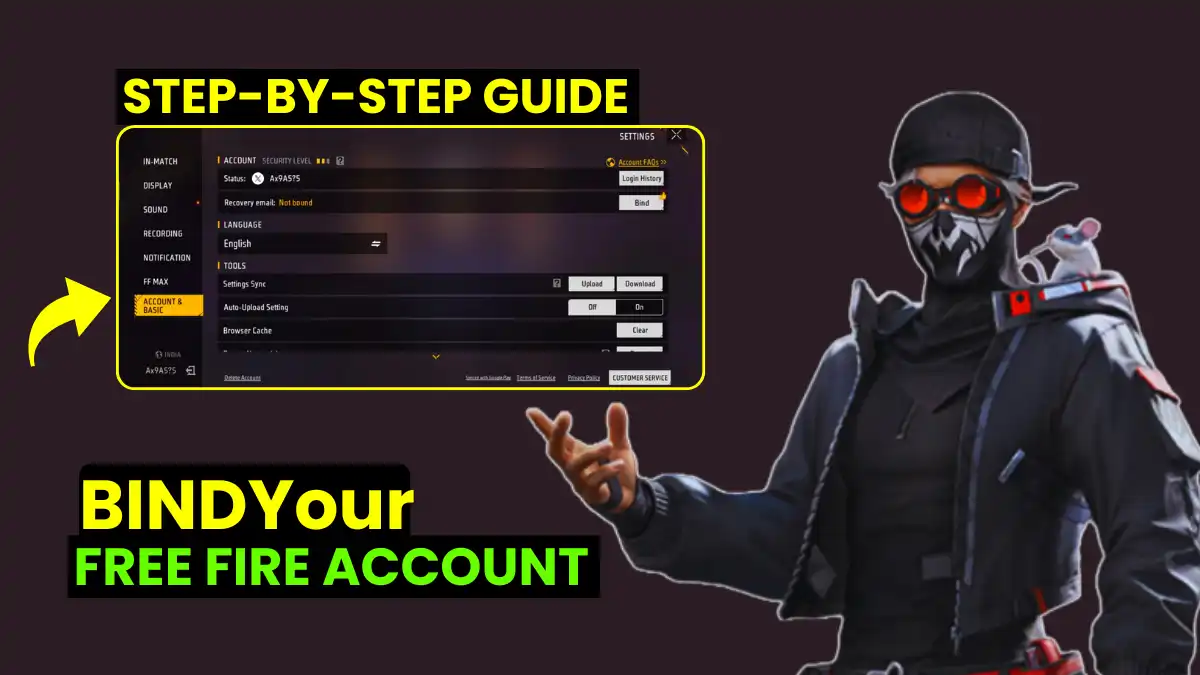
How to Bind Your Account in Just 2 Minutes (Step-by-Step)
Follow Garena’s official method:
- Open Free Fire MAX.
- Go to Settings → Account & Basic → Account.
- Tap the Bind button.
- Choose your platform: Gmail (Google), Facebook, X (Twitter), VK, or Apple ID.
- Log in to that platform and set your username.
- Done! Your account is now bound and secure.
Also bind a recovery email in Settings for extra protection. This helps if you ever lose access to your main platform.
Final Advice
After 7 years of playing and watching the community, one thing is 100% true: never stick with a guest account. Bind your account the moment you install Free Fire MAX. You’ll enjoy daily gifts, mission rewards, and safe redeem code claims without ever worrying about loss.
If you’re still on guest mode, stop right now and bind it. You’ll thank yourself later when your account is safe forever.
Is your account already bound, or are you still on guest? Drop a comment below and let me know! If this helped, share it with your squad and follow for more Free Fire MAX tips.
Frequently Asked Questions
No, guest account is not considered safe as it may lead to data loss after phone reset or uninstall.
Not in most cases, because there’s no official recovery system for guest accounts.
Go to Game settings → Account / Basic settings → Link to Google/Facebook/VK.
Rewards are usually found in the in-game mail (vault/mailbox).
Google and Facebook are the most trusted and stable options.